
고정 헤더 영역
상세 컨텐츠
본문
728x90

1.1 REPL 사용하기 / JS 파일 실행하기
1) REPL
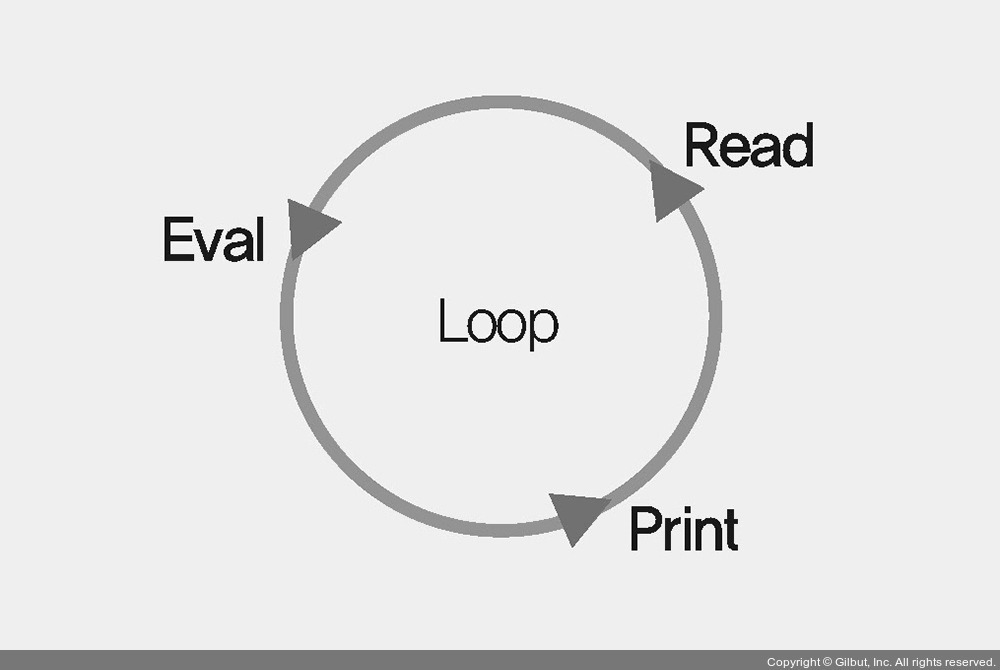
▲ REPL
- JavaScript 와 같은 스크립트 언어는 컴파일할 필요 없이 즉시 코드를 실행할 수 있음.
- 입력한 코드를 읽고, 해석하고, 결과물을 반환하고, 종료할 때까지 반복하는 것을 REPL이라고 칭함.
- 노드가 제공하는 콘솔에서 이를 사용할 수 있음. node를 입력하여 REPL 창에 들어갈 수 있고, CTRL+C를 두 번 누르거나 .exit를 입력하여 종료할 수 있음.
// 콘솔
$ node

> const str="Hello node";
undefined
> console.log(str);
Hello node
2) JS 파일 실행하기
- 긴 코드를 실행하기엔 파일이 용이함.
- JS 파일을 만든 후 콘솔에서 명령어 node [JS 파일 경로]를 통해 실행할 수 있음.
1.2 모듈로 만들기
모듈: 특정한 기능을 하는 함수나 변수들의 집합
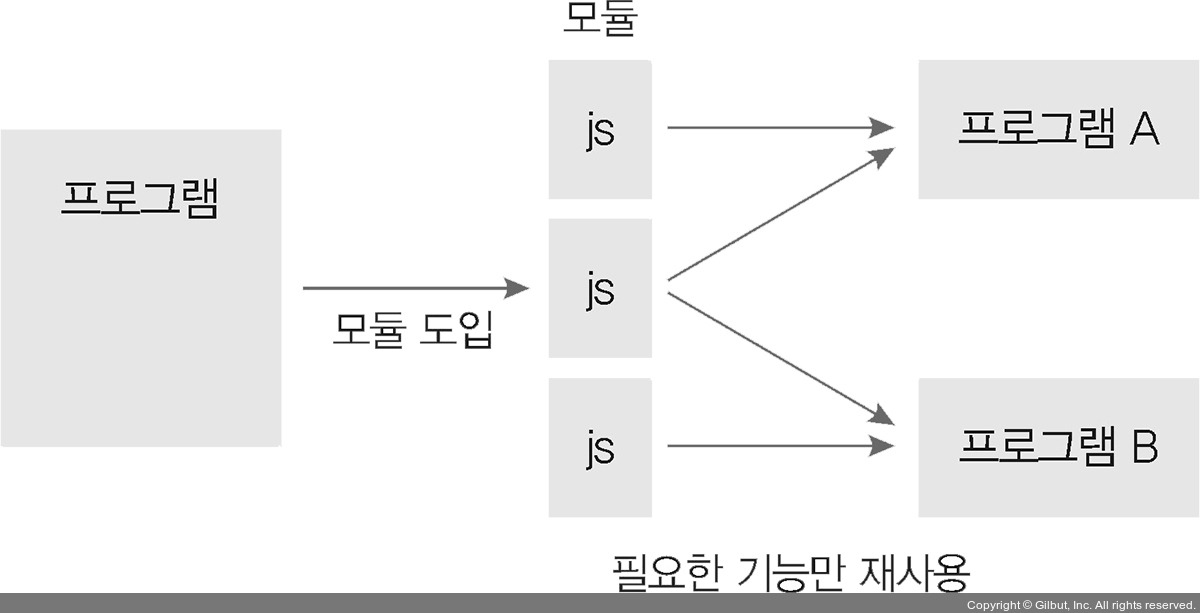
- 노드는 브라우저의 자바스크립트와 달리 코드를 모듈로 만들 수 있음.
- 한 번 만든 모듈을 다른 프로그램에서 재사용이 가능함.
- 보통 파일 하나가 모듈 하나가 됨.
- 노드는 CommonJs, ECMAScript 이라는 두 가지 형식의 모듈을 사용함.
1.3 노드 내장 객체 알아보기
- global: 전역 객체. 모든 파일에서 접근 가능함.
- console: 대표적으로 console.log 메서드가 있음. 변수에 값이 제대로 들어 있는지 확인하거나, 에러 내용을 콘솔에 표시하기 위해서 사용하기도 함.
- 타이머: setTimeout, setInterval, setImmediate 와 같은 메서드는 타이머 기능을 제공함. 이들은 아이디를 반환하며, 아이디를 사용했을 때 타이머를 취소할 수 있음.
- process: 현재 실행되고 있는 노드 프로세스에 대한 정보를 담고 있음.
1.4 노드 내장 모듈 사용하기
- os: 웹 브라우저에 사용되는 자바스크립트와 달리, 노드는 os 모듈에 정보가 담겨 있어 운영체제의 정보를 가져올 수 있음. require('os') 또는 require('node:os')를 통해 os 모듈을 불러올 수 있음.
// os.js
const os = require('os');

console.log('운영체제 정보---------------------------------');
console.log('os.arch():', os.arch());
console.log('os.platform():', os.platform());
console.log('os.type():', os.type());
console.log('os.uptime():', os.uptime());
console.log('os.hostname():', os.hostname());
console.log('os.release():', os.release());

console.log('경로------------------------------------------');
console.log('os.homedir():', os.homedir());
console.log('os.tmpdir():', os.tmpdir());

console.log('cpu 정보--------------------------------------');
console.log('os.cpus():', os.cpus());
console.log('os.cpus().length:', os.cpus().length);

console.log('메모리 정보-----------------------------------');
console.log('os.freemem():', os.freemem());
console.log('os.totalmem():', os.totalmem());- path: 폴더와 파일의 경로를 쉽게 조작할 수 있게 도와줌. 운영체제는 크게 윈도 타입과 POSIX 타입으로 구분되며, 운영체제별로 경로 구분자가 다르기 때문에 path 모듈이 필요함. __filename, __dirname은 각각 현재 파일과 현재 폴더의 경로를 표시함.
- 윈도: C:\Users\ZeroCho처럼 \로 구분
- POSIX: /home/zerocho처럼 /로 구분
// path.js
const path = require('path');

const string = __filename;

console.log('path.sep:', path.sep);
console.log('path.delimiter:', path.delimiter);
console.log('------------------------------');
console.log('path.dirname():', path.dirname(string));
console.log('path.extname():', path.extname(string));
console.log('path.basename():', path.basename(string));
console.log('path.basename - extname:', path.basename(string, path.extname(string)));
console.log('------------------------------');
console.log('path.parse()', path.parse(string));
console.log('path.format():', path.format({
  dir: 'C:\users\zerocho',
  name: 'path',
  ext: '.js',
}));
console.log('path.normalize():', path.normalize('C://users\\zerocho\\path.js'));
console.log('------------------------------');
console.log('path.isAbsolute(C:\):', path.isAbsolute('C:\'));
console.log('path.isAbsolute(./home):', path.isAbsolute('./home'));
console.log('------------------------------');
console.log('path.relative():', path.relative('C:\users\zerocho\path.js', 'C:\'));
console.log('path.join():', path.join(__dirname, '..', '..', '/users', '.', '/zerocho'));
console.log('path.resolve():', path.resolve(__dirname, '..', 'users', '.', '/zerocho'));- url: 인터넷 주소를 쉽게 조작할 수 있게 도와주는 모듈. WHATWG와 기존에 사용하던 방식의 url을 이용함. url 모듈 안에 URL 생성자가 있으며, 이 생성자에 주소를 넣어 객체로 만들면 주소가 부분별로 정리됨.
// url.js
const url = require('url');

const { URL } = url;
const myURL = new URL('http://www.gilbut.co.kr/book/bookList.aspx?sercate1=001001000#anchor');
console.log('new URL():', myURL);
console.log('url.format():', url.format(myURL));
- dns: DNS를 다룰 때 사용하는 모듈. 주로 도메인을 통해 IP나 기타 DNS 정보를 얻고자 할 때 사용함. dns.lookup이나 dns.resolve(도메인)을 통해 ip 주소를 얻을 수 있음.
// dns.mjs
import dns from 'dns/promises';

const ip = await dns.lookup('gilbut.co.kr');
console.log('IP', ip);

const a = await dns.resolve('gilbut.co.kr', 'A');
console.log('A', a);

const mx = await dns.resolve('gilbut.co.kr', 'MX');
console.log('MX', mx);

const cname = await dns.resolve('www.gilbut.co.kr', 'CNAME');
console.log('CNAME', cname);

const any = await dns.resolve('gilbut.co.kr', 'ANY');
console.log('ANY', any);
- crypto: 다양한 방식의 암호화를 도와주는 모듈. 비밀번호는 반드시 암호화하여야 함. 단방향 암호화 알고리즘, 양방향 대칭형 암호화와 같은 방식이 있음.
- util: 각종 편의 기능을 모아둔 모듈. util.deprecate, util.promisify와 같은 메서드를 가짐.
- worker_threads: 이 모듈을 통해 노드에서 멀티 스레드 방식으로 작업할 수 있음. isMainThread를 통해 현재 코드가 메인 스레드(기존에 동작하던 싱글 스레드)에서 실행되는지, 아니면 워커 스레드에서 실행되는지 구분할 수 있음.
// worker_threads.js
const {
  Worker, isMainThread, parentPort,
} = require('worker_threads');

if (isMainThread) { // 부모일 때
  const worker = new Worker(__filename);
  worker.on('message', message => console.log('from worker', message));
  worker.on('exit', () => console.log('worker exit'));
  worker.postMessage('ping');
} else { // 워커일 때
  parentPort.on('message', (value) => {
    console.log('from parent', value);
    parentPort.postMessage('pong');
    parentPort.close();
  });
}
- child_process: 노드에서 다른 프로그램을 실행하고 싶거나 명령어를 수행하고 싶을 때 사용하는 모듈. 이 모듈을 통해 다른 언어의 코드를 실행하고 결괏값까지 받을 수 있음. 즉, 현재 노드 프로세스 외에 새로운 프로세스를 띄워서 명령을 수행하고 노드 프로세스에 결과를 알려줌.
- 아래의 예제 코드는 노드에서 spawn 메서드를 통해 파이썬 프로그램을 실행함.
// test.py
print('hello python')

// spawn.js
const spawn = require('child_process').spawn;

const process = spawn('python', ['test.py']);

process.stdout.on('data', function(data) {
  console.log(data.toString());
}); // 실행 결과

process.stderr.on('data', function(data) {
  console.error(data.toString());
}); // 실행 에러
1.5 파일 시스템 접근하기
- fs 모듈을 통해 파일 시스템에 접근할 수 있음. 파일을 생성하거나 삭제하고, 읽고 쓸 수 있는 권한을 가짐.
- 버퍼(buffer)란 메모리의 데이터를 말함. toString 메서드를 통해 문자열로 변환해야지만 읽을 수 있음. 버퍼 객체는 from, toString, concat 등의 메서드를 제공함.
- fs 모듈에서 promise 속성을 불러오면 프로미스 기반의 fs 모듈을 사용할 수 있음.
// writeFile.js
const fs = require('fs');
// writeFile 메서드에 생성될 파일의 경로와 내용 입력
fs.writeFile('./writeme.txt', '여기에 내용 입력', (err) => {
  if (err) {
    throw err;
  }
  // 파일 읽기
  fs.readFile('./writeme.txt', (err, data) => {
    if (err) {
      throw err;
    }
    console.log(data.toString());
  });
});- 동기 메서드와 비동기 메서드: 동기는 요청한 작업에 대해, 완료 여부를 따지고 순서대로 처리함. 반면 비동기는 요청한 작업의 완료 여부를 따지지 않으며, 다수의 요청을 받을 때 응답에서의 순서가 지켜지지 않음. 즉, 비동기 메서드들은 백그라운드에 해당 파일을 읽으라고 요청만 한 후 다음 작업으로 넘어가게 됨.
1.6 이벤트 / 예외 처리
- 객체 myEvent는 이벤트 관리를 위해 on, removeAllListeners 등 메서드를 가지고 있음.
- 예외란 보통 처리하지 못한 에러를 말하며, 이는 실행 중인 노드 프로세스를 멈추게 함.
- 노드는 하나의 메인 스레드를 가지므로 에러가 발생한다면 스레드를 가진 프로세스가 멈추고, 전체 서버까지 영향을 받음.
- 사전에 try/catch문으로 에러가 발생할 것 같은 부분을 감싸서 에러를 처리할 수 있음.
2.1 http 모듈로 서버 만들기
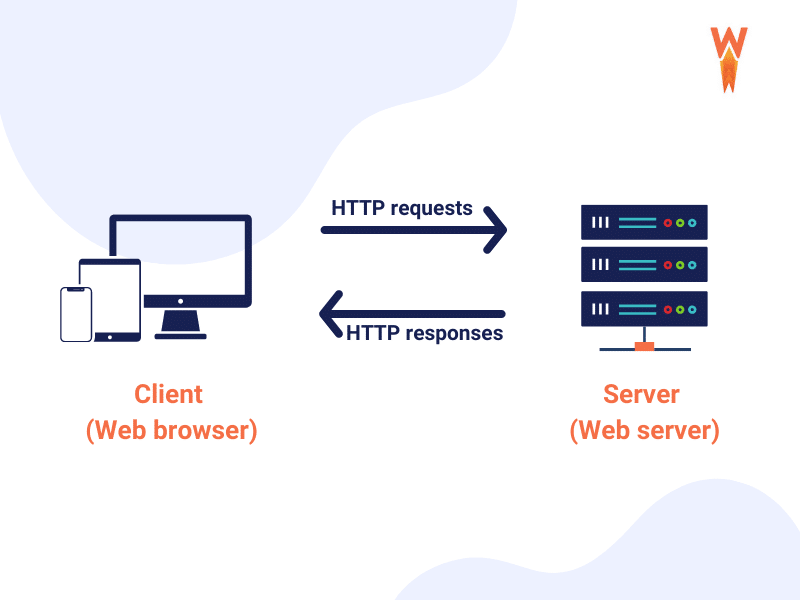
- 클라이언트는 서버로 요청을 보내고, 서버는 요청을 처리한 후 클라이언트에게 응답을 보냄.
- 요청/응답은 이벤트 방식이므로, 서버는 이벤트 리스너를 미리 등록하여 요청을 받았을 때 작업을 수행할 수 있어야 함.
- http 모듈은 createServer()라는 메서드를 가지며, 이는 매개변수 req와 res를 가짐.
req: 요청에 관한 정보를 담는 객체. req.body, req.cookies, req.app 등의 메서드를 가짐.
res: 응답에 관한 정보를 담는 객체. res.writeHead, res.write, res.end, res.app, res.cookie 등의 메서드를 가짐.
- createServer 뒤 listen 메서드를 붙이고 포트 번호와 실행될 콜백 함수를 넣어야 함. 이후 클라이언트에게 요청이 들어올 때마다 콜백 함수가 실행됨.
- 에러와 관계없이 클라이언트에게 반드시 응답을 보내야 함.
- 포트 번호를 달리 하여 한 번에 여러 서버를 실행할 수 있음.
HTTP 상태 코드: 브라우저는 서버가 보내준 상태 코드를 통해 요청의 성공 여부를 판별함.
- 2xx (성공)
- 3xx (리다이렉션)
- 4xx (요청 오류)
- 5xx (서버 오류)
//createServer.js
const http = require('http');

http.createServer((req, res) => {
  // 여기에 어떻게 응답할지 적기
  res.writeHead(200, { 'Content-Type': 'text/html; charset=utf-8' }); // 요청 성공(200)과 응답에 대한 정보 전송
  res.write('<h1>Hello Node!</h1>'); // 클라이언트에게 보내는 데이터
  res.end('<p>Hello Server!</p>'); // 데이터를 보낸 후 응답 종료
});
 .listen(8080, () => { // 서버와 연결하기
    console.log('서버 대기 중');
});
2.2 REST와 라우팅 사용하기
REST=REpresentational State Transfer
- REST는 서버의 자원을 정의하고 이에 대한 주소를 지정하는 방법을 알려주는 하나의 약속과 같음. 여기서 자원이란 REST가 관리하는 모든 데이터를 뜻하며, 텍스트, 이미지, 동영상 등 다양한 내용이 자원이 될 수 있음.
- 서버는 명사로 구성된 주소를 통해 요청의 목적을 밝힘. HTTP 요청 메서드를 통해 수행할 동작을 알 수 있음. 이때 주소 하나는 다수의 요청 메서드를 가질 수 있음. ex) /user로 GET, POST 메서드
- 서버와 클라이언트가 분리되어 있기에 다양한 클라이언트들과 같은 방식으로 서버와 소통할 수 있음.
대표적인 HTTP 요청 메서드:
- GET: 서버 자원 가져올 때 사용
- POST: 서버에 자원을 새로 등록할 때 사용
- PUT: 서버의 자원을 요청에 들어 있는 자원으로 치환
- PATCH: 서버 자원의 일부 수정
- DELETE: 서버 자원 삭제
- OPTIONS: 요청 전 통신 옵션 설명
2.3 쿠키와 세션

- 클라이언트를 기억하기 위해 서버는 요청에 대한 응답을 보낼 때 쿠키를 함께 보냄. 그다음부터 웹 브라우저는 저장해 둔 쿠키를 요청할 때 함께 보내고, 서버는 이 쿠키를 읽어 들여 클라이언트를 파악함.
- 쿠키는 유효 기간이 있으며, '키-값' 쌍의 형태를 가짐. 요청의 헤더에 담겨 전송됨. ex) 'flavor=choco'
2.3 https와 http2
- https 모듈은 웹 서버에 SSL(Secure Sockets Layer) 암호화를 추가함. 즉, GET/POST 요청을 할 때 오가는 데이터를 암호화하여 기밀성을 유지함.
- 암호화되어 있지 않은 서버에 암호화를 적용하려면 인증서를 발급받아야 함.
- https 모듈을 적용하려면 createServer 메서드가 기존 인수뿐만 아니라 인증서에 관련된 옵션 객체를 인수로 받아야 함.
- 노드의 http2 모듈은 SSL 암호화와 더불어 최신 HTTP 프로토콜인 http/2를 사용할 수 있게 함. http/2는 요청 및 응답 방식이 기존 http/1.1보다 효율적임.
- http2 모듈을 적용하려면 https 모듈을 http2로, createServer 메서드를 createSecure Server 메서드로 바꿔야 함.
2.4. Cluster
- 클러스터 모듈은 싱글 프로세스로 동작하는 노드가 모든 cpu 코어를 사용할 수 있게 해주는 모듈임. 예를 들어 코어가 여덟 개인 서버가 있어도, 노드는 코드를 하나만 활용함. 이때 클러스트 모듈을 설정하면 코어 하나당 노드 프로세스 하나가 돌아가게 할 수 있음. 즉, 성능을 개선할 수 있으나 메모리를 공유하지 못한다는 단점도 보유하고 있음.

▲ 클러스터링
- 클러스트는 마스터 프로세스와 워커 프로세스로 나뉨. 이때 마스터 프로세스는 CPU 개수만큼 워커 프로세스를 만들고, 8086번 포트에서 대기함. 요청이 들어오면 만들어진 워커 프로세스에 요청을 분배함.
- 워커 프로세스는 실질적인 작업을 수행함.
- 클러스터 모듈 뿐만 아니라 pm2 등의 모듈로도 클러스트링을 구현할 수 있음.
♬ QUESTIONS
빈칸QUIZ
- ____ 는 서버의 자원을 정의하고 이에 대한 주소를 지정하는 방법을 지정한다.
- __ 모듈을 통해 파일 시스템에 접근하여 파일을 생성하거나 삭제하고, 읽고 쓸 수 있다.
- 노드에서 멀티 스레드 방식으로 작업하기 위해 _______ 모듈을 사용할 수 있다.
- _____ 모듈은 싱글 프로세스로 동작하는 노드가 모든 cpu 코어를 사용할 수 있게 해주는 모듈이다.
- 서버는 클라이언트를 기억하기 위해 요청에 대한 응답을 보낼 때 ___ 를 함께 보낸다.
코드작성QUIZ
1. 아래 코드를 실행했을 때의 문제점을 쓰시오.
const fs = require('fs');
fs.writeFile('./writeme.txt', '여기에 내용 입력', (err) => {
  if (err) {
    throw err;
  }
  fs.readFile('./writeme.txt', (err, data) => {
    if (err) {
      throw err;
    }
    console.log();
  });
});
2. 아래의 빈칸 1, 2에 들어갈 키워드를 작성하시오.
const http = require('http');

http.(  1  )((req, res) => {
  res.writeHead(200, { 'Content-Type': 'text/html; charset=utf-8' });
  res.write('<h1>Hello Node!</h1>');
  res.end('<p>Hello Server!</p>');
});
 .(  2  )(8080, () => {
    console.log('서버 대기 중');
});
<빈칸QUIZ 답>
- REST
- fs
- worker_threads
- 클러스터(cluster)
- 쿠키(cookie)
<코드작성QUIZ 답>
1. console.log() 안에 data.toString()을 넣지 않아 사람이 읽을 수 없는 버퍼가 출력된다.
2. createServer, listen
출처 : 조현영, 『 Node.js 교과서 개정 3판』, 길벗(2022)
node.js : https://nodejs.org/ko/learn
Corner Node.js 2
Editor Coin
728x90
'25-26 > Node.js 2' 카테고리의 다른 글
| [Node.js 2팀] 8장. 몽고디비 (0) | 2025.11.21 |
|---|---|
| [Node.js 2팀] 7장. MySQL (1) | 2025.11.14 |
| [Node.js 2팀] 5장. 패키지 매니저~ 6장. 익스프레스 웹 서버 만들기 (0) | 2025.11.07 |
| [Node.js 2팀] 1장. 노드 시작하기 ~ 2장. 알아둬야 할 JavaScript (0) | 2025.10.10 |
| [Node.js 2팀] 1장 자바스크립트( Introductions ~ Objects ) (0) | 2025.10.03 |