
고정 헤더 영역
상세 컨텐츠
본문
728x90

1. DB(Data Base)
지금까지는 변수에 모든 데이터를 저장.
- 서버 종료시 메모리 정리 → 변수에 저장된 데이터도 사라짐
DB를 이용하면, 서버가 종료되어도 데이터가 사라지지 않게 할 수 있음.
DataBase
- 관련성을 가지며, 중복이 없는 데이터들의 집합
DataBase Management System(DBMS)
- DB를 관리하는 시스템
- RDBMS(Relational DBMS)
- 관계형 DBMS를 많이 사용함.
- Oracle, MySQL, MMSQL 등등이 해당
2. MySQL과 WorkBench 설치
MySQL 설치
- MySQL 공식 사이
- https://dev.mysql.com/downloads/installer/
MySQL :: Download MySQL Installer
MySQL Installer 8.0.44 Note: MySQL 8.0 is the final series with MySQL Installer. As of MySQL 8.1, use a MySQL product's MSI or Zip archive for installation. MySQL Server 8.1 and higher also bundle MySQL Configurator, a tool that helps configure MySQL Serve
dev.mysql.com
- MySQL 설치 이후 Commend Prompt에서 MySQL 접속
$ mysql -h [접속할 주소] -u [사용자 이름] -p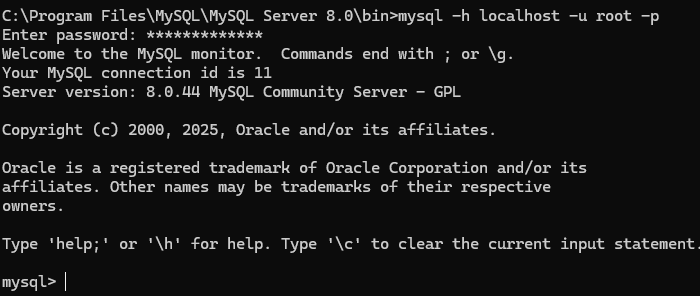
- 이후 프롬프트에 SQL명령어를 입력
- 콘솔로 돌아가려면 exit 명령어를 입력
mysql> exit
MySQL Workbench
- 콘솔로는 데이터를 한눈에 보기 무리가 있어, 워크벤치를 이용함.
- 워크 벤치는 데이터 베이스 내부에 저장된 데이터를 시각적으로 관리.
- 윈도우의 경우 MySQL설치시 함께 설치할 수 있음.
- https://dev.mysql.com/downloads/workbench/
MySQL :: Download MySQL Workbench
dev.mysql.com
3. 커넥션 생성
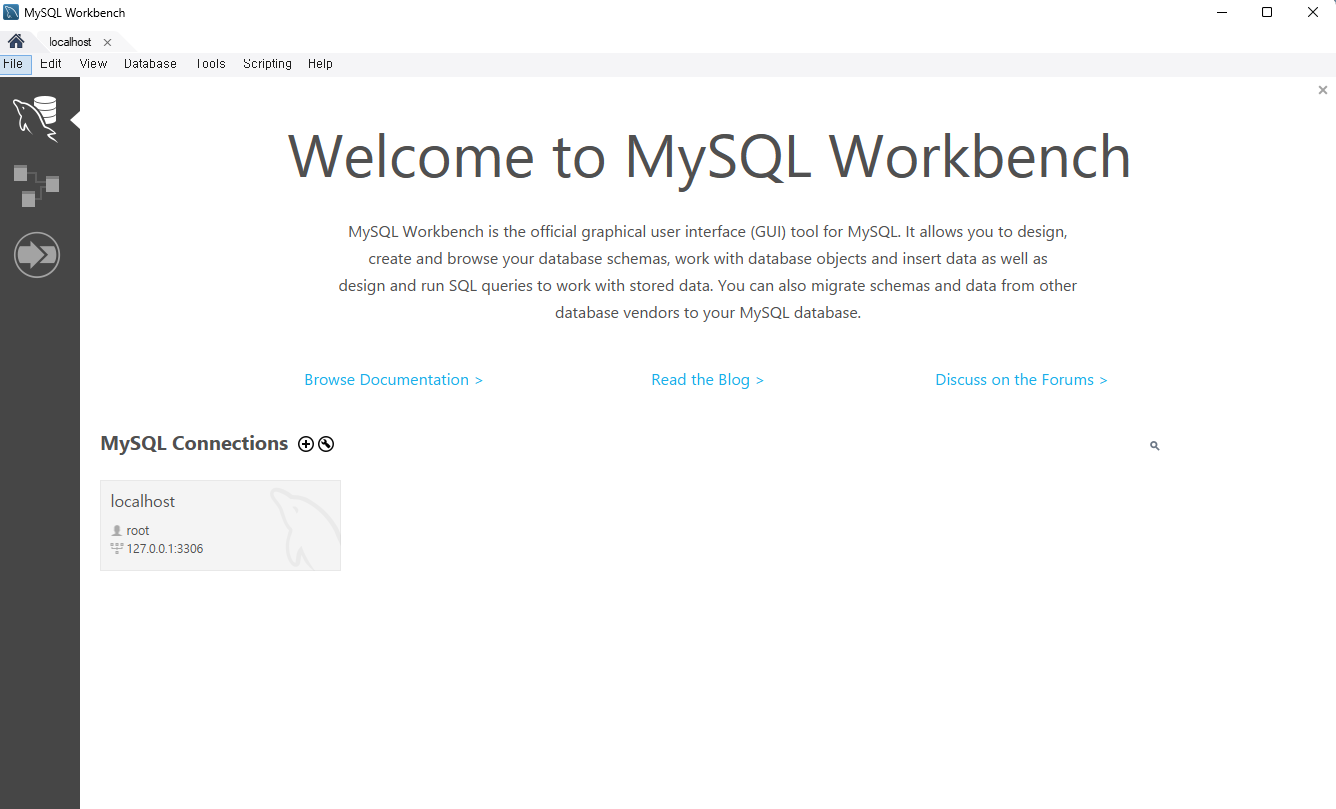

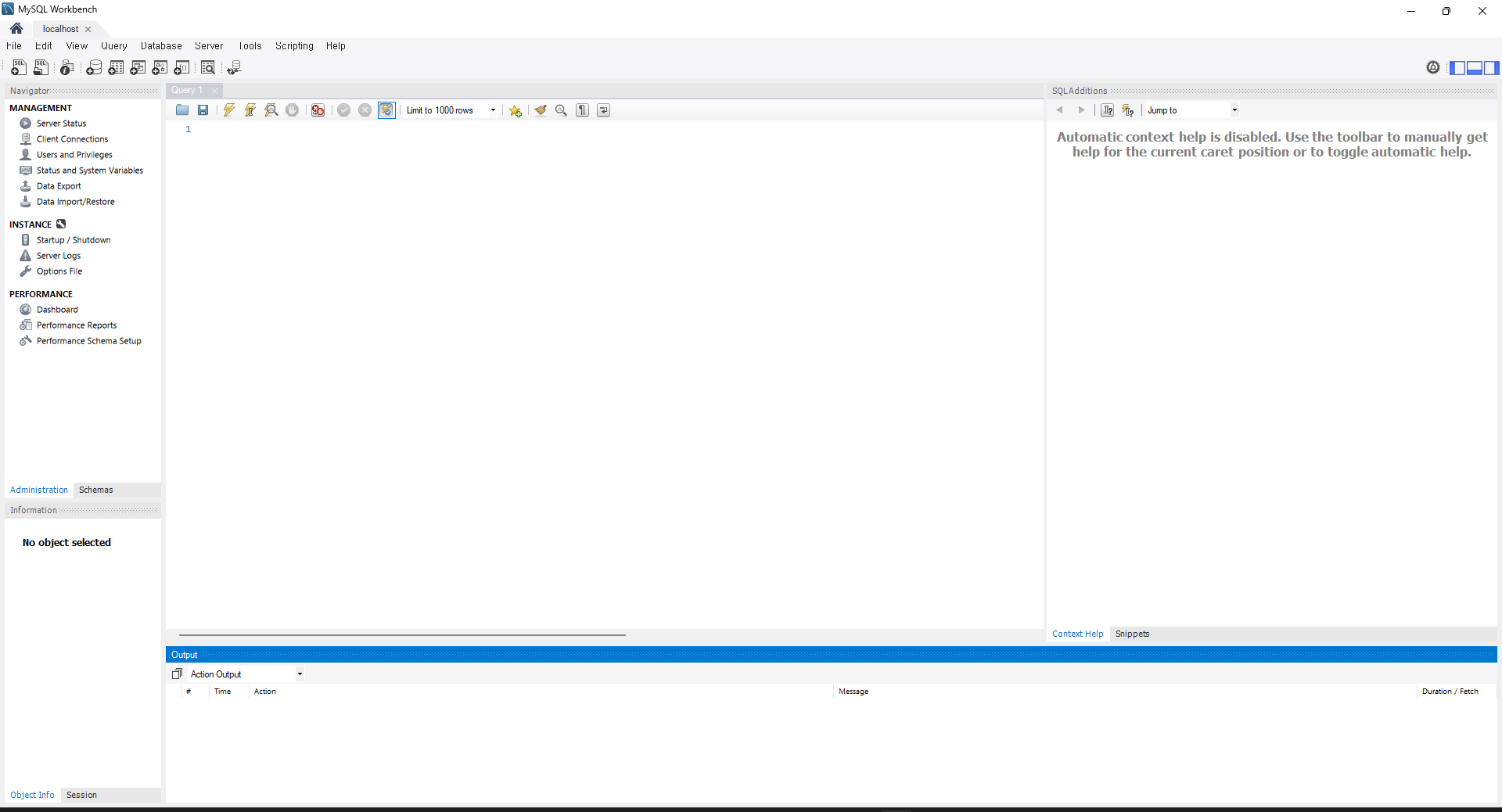
- MySQL Connections 옆에 + 버튼으로 커넥션을 생성
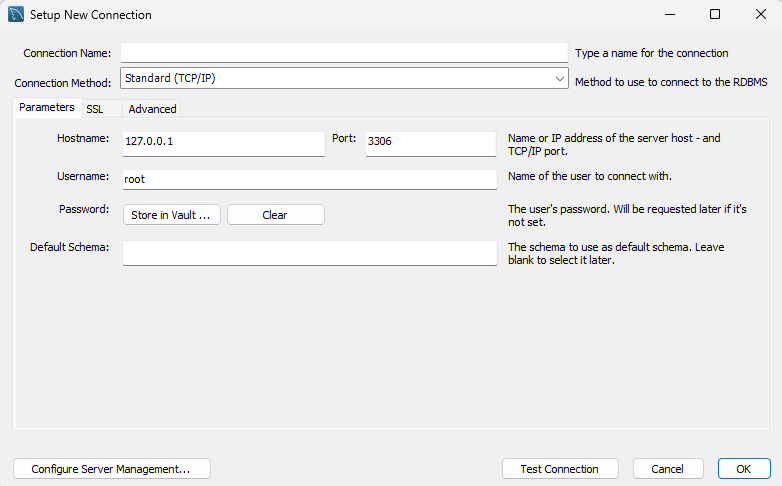
- Connection Name과 Password를 설정함
- Password 에서 Store in Vault..클릭
- 이때 Password는 MySQL 설치시 설정한 Password를 입력
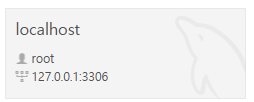
- 새로 생성된 커넥션을 눌러 접속
4. 데이터베이스 및 테이블 생성하기 - 프롬프트 이용
1) SQL
- 문장의 마지막에 세미콜론(;) 표기 필수
- 예약어는 모두 대문자
2) 데이터베이스(DB, SCHEMA) 생성
$ mysql -h [접속할 주소] -u [사용자 이름] -p- 위의 명령어를 이용해 MySQL 프롬프트에 접속
CREATE SCHEMA [데이터베이스명];

CREATE SCHEMA [데이터베이스명] DEFAULT CHARACTER SET utf8mb4 DEFAULT COLLATE utf8mb4_general_ci;- 데이터 베이스(SCHEMA) 생성
- DEFAULT CHARACTER SET utf8mb4
- utf8mb4로 한글과 이모티콘을 사용할 수 있도록 함.
- COLLATE utf8mb4_general_ci
- CHARACTER SET을 어떤 형식으로 정할지 의미
- 기본값 : COLLATE는 utf8mb4_0900_ai_ci
- 한글 문제로 utf8mb4_general_ci 이용
use [데이터베이스명];- 앞으로 사용할 데이터베이스를 선언
3) 테이블 생성
mysql> CREATE TABLE [DB명.테이블명] (
    -> [컬럼명] [자료형_type] [옵션],
    -> . . .
    -> [컬럼명] [자료형_type] [옵션])

    -> COMMENT = '테이블 보충 설명'
    -> ENGINE = InnoDB; -- MyISAM 과 InnoDB를 주로 이용
Query OK, 0 row affected (0.09 sec)- 컬럼에 대한 정보와, 테이블 그 자체에 대한 정보로 나뉘어짐.
mysql> CREATE TABLE nodejs.users (
    -> id INT NOT NULL AUTO_INCREMENT,
    -> name VARCHAR(20) NOT NULL,
    -> age INT UNSIGNED NOT NULL,
    -> married TINYINT NOT NULL,
    -> comment TEXT NULL,
    -> created_at DATETIME NOT NULL DEFAULT now(),
    -> PRIMARY KEY(id),
    -> UNIQUE INDEX name_UNIQUE (name ASC))
    -> COMMENT = '사용자 정보'
    -> ENGINE = InnoDB;
Query OK, 0 row affected (0.09 sec)- use 를 사용한 경우 CREATE TABLE에서 `DB명.`은 생략해도 됨
- id(고유 식별자), name(이름), age(나이), married(결혼 여부), comment(자기소개), created_at(로우 생성일)
4) 컬럼
mysql> CREATE TABLE nodejs.users (
    -> id INT NOT NULL AUTO_INCREMENT, --[컬럼명] [자료형_type] [옵션]
    -> name VARCHAR(20) NOT NULL,
    -> age INT UNSIGNED NOT NULL,
    -> married TINYINT NOT NULL,
    -> comment TEXT NULL,
    -> created_at DATETIME NOT NULL DEFAULT now(),
    -> PRIMARY KEY(id),
    -> UNIQUE INDEX name_UNIQUE (name ASC));
- 위의 예제처럼 컬럼은 컬럼 데이터의 자료형, 옵션으로 이루어져 있음
- 자료형 : INT, VARCHAR, TINYINT, TEXT, DATETIME 처럼 컬럼명 옆에 표기
- INT : 정수
- TINYINT : -128~127 까지의 정수 저장
- 0,1만 저장하면 boolean과 같은 역할로 사용 가능
- VARCAHR(자릿수) : 가변 길이 문자열
- 0~자릿수 까지의 문자열을 입력받을 수 있음
- CHAR(자릿수) : 고정 길이 문자열
- 무조건 자릿수만큼의 문자열만 넣을 수 있음
- TEXT : 긴글을 저장할 때 이용
- 수백자 이상의 문자열
- DATETIME : 날짜와 시간 정보
- DATE : 날짜 정보
- TIME : 시간 정보
- 옵션 : 자료형 뒤에 NOT NULL, NULL, UNSIGNED, AUTO_INCREMENT, DEFAULT 표기
- NULL / NOT NULL
- 로우 생성시 빈칸을 허용할지 여부
- NULL : 빈칸 허용 / NOT NULL : 빈칸 비허용
- AUTO_INCREMENT
- 로우 생성지 자동으로 숫자를 증가
- 등록 번호 등으로 데이터를 관리해야 할 때 설정
- UNSIGNED
- 음수 무시
- 실수 자료형에는 적용 불가
- ZEROFILL
- 숫자의 자릿수 고정, INT(자릿수) 자료형 뒤에 붇음
- DEFAULT [기본값]
- 해당 컬럼에 값이 없을 때, MySQL이 기본 값을 대신 넣음
- now() / CURRENT_TIMESTAMP : 현재 시각을 넣음
- PRIMARY KEY( [컬럼] )
- 로우를 대표하는 고유한 값을 의미
- ex) 주민등록번호
- 조회 속도 증가
- UNIQUE INDEX 특성을 포함함
- 로우를 대표하는 고유한 값을 의미
- UNIQUE INDEX
- 해당값 고유해야하는지 옵션
- 예제 ) 인덱스의 이름은 name_UNIQUE로, name 컬럼을 오름차순(ASC)으로 기억
- 내림차순(DESC)
- 조회 속도 증가
- NULL / NOT NULL
5) 테이블 설정
mysql> COMMENT = '사용자 정보'
-> ENGINE = InnoDB;- COMMENT는 테이블 설명
- ENGINE은 테이블 엔진 InnoDB와 MyISAM을 주로 이용
6) 테이블 조회
mysql> DESC [테이블명];- DESC 명령어를 이용

7) 테이블 삭제
mysql> DROP TABLE [테이블 명];- DROP TABLE 이용
8) 외래키(foregn key)
- 다른 테이블의 기본키를 저장하는 컬럼
- 어떤 데이터는 다른 데이터와 함께 저장해야하는 경우가 있음
- 일반적으로 댓글 데이터들은 댓글을 단 시각, 댓글의 내용, 댓글을 쓴 user의 정보를 가지고 있어야함
mysql> CREATE TABLE nodejs.comments (
    -> id INT NOT NULL AUTO_INCREMENT,
    -> commenter INT NOT NULL, -- users의 id정보를 담음
    -> comment VARCHAR(100) NOT NULL,
    -> created_at DATETIME NOT NULL DEFAULT now(),
    -> PRIMARY KEY(id),
    -> INDEX commenter_idx (commenter ASC),
    -> CONSTRAINT commenter
    -> FOREIGN KEY (commenter)
    -> REFERENCES nodejs.users (id)
    -> ON DELETE CASCADE
    -> ON UPDATE CASCADE)
    -> COMMENT = '댓글'
    -> ENGINE=InnoDB;
Query OK, 0 row affected (0.09 sec)- 새로운 테이블 comments 생성
mysql> CREATE TABLE nodejs.comments (
    -> ...
    -> commenter INT NOT NULL,
    -> ...
    -> INDEX commenter_idx (commenter ASC),
    -> --  CONSTRAINT [제약조건명] FOREIGN KEY [컬럼명] REFERENCES [참고하는 컬럼명]
    -> CONSTRAINT commenter --[제약조건명]
    -> FOREIGN KEY (commenter) --[컬럼명]
    -> REFERENCES nodejs.users (id)--[참고하는 컬럼명]
    -> ON DELETE CASCADE
    -> ON UPDATE CASCADE
-> )- CONSTAINT [제약조건명] FOREIGN KEY [컬럼명] REFERENCES [참고하는 컬럼명] 으로 외래 키 지정
- ON DELETE / ON DELETE를 CASCADE로 설정
- 참고하는 컬럼이 수정되거나 삭제 될 경우, 댓글 정보도 같이 수정되거나 삭제
9) DB 내부의 테이블 조회
mysql> SHOW TABLES;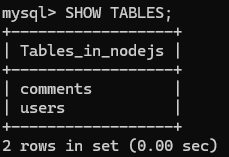
5. 데이터베이스 및 테이블 생성하기 - 워크벤치 이용
1. 데이터베이스 생성

- (+) DB 모양의 아이콘을 눌러 새로운 DB(SCHEMA) 생성
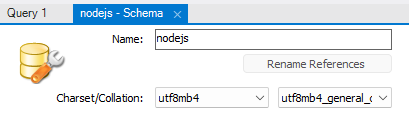
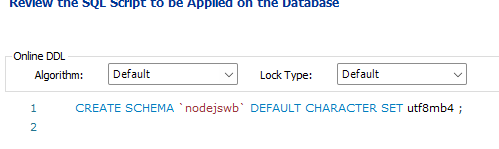
- 콘솔로 실행했던 작업이 똑같이 진행됨
- Collation에 대한 명령어가 없으므로 뒤에 COLLATE utf8mb4_general_ci를 추가
** 이미 콘솔로 nodejs라는 Schema를 생성해, 같은 이름의 schema를 생성할 수 없어,
워크벤치로는 nodejswb라는 이름으로 생성함.
2. 테이블 생성
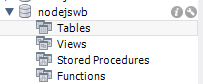
- Tables를 우클릭해 새로운 테이블 생성
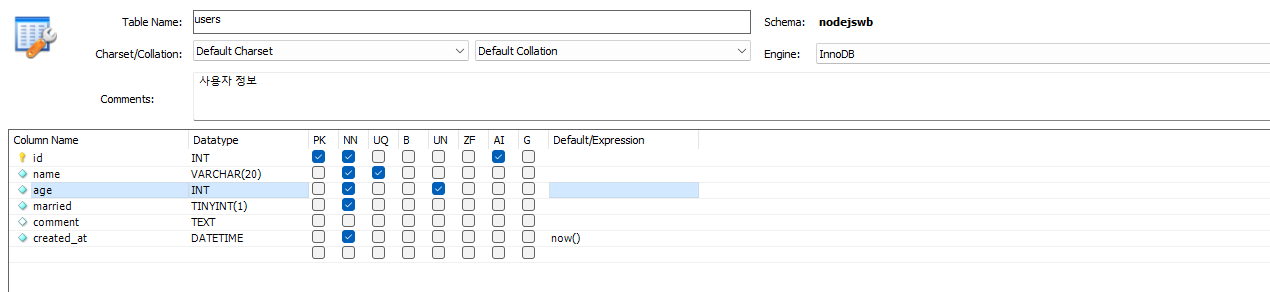
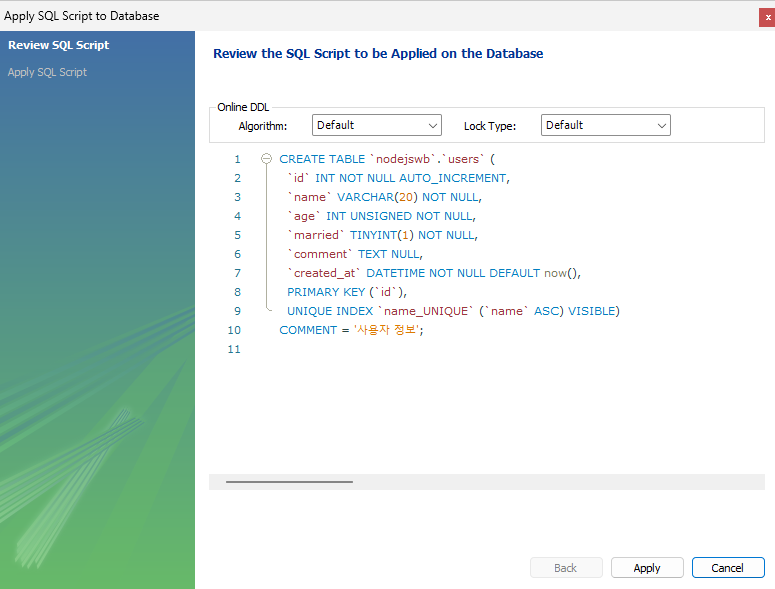
- 콘솔로 생성한 것과 동일하게 생성됨
3) 외래키 지정
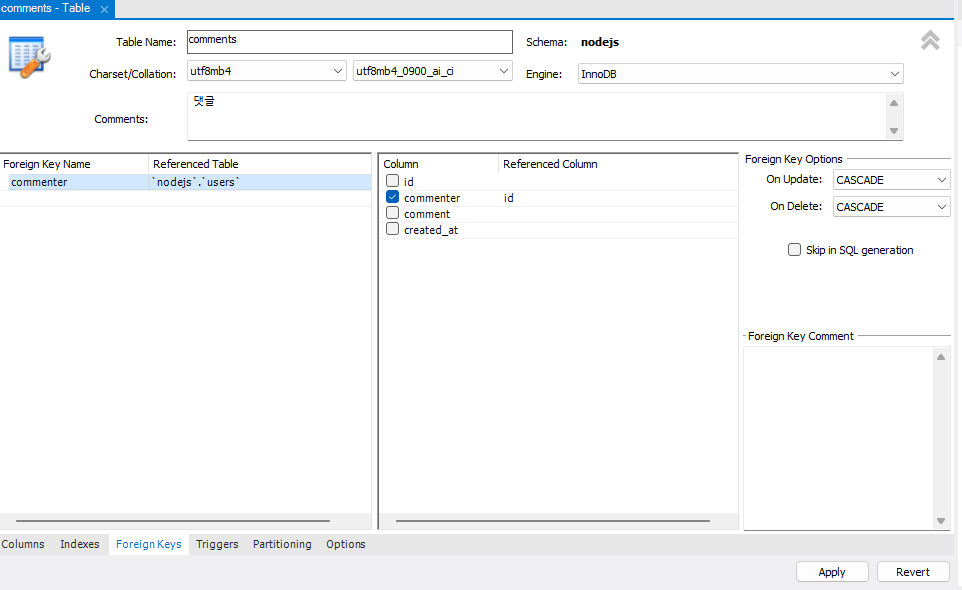
- Columns 설정 후 Foreign Keys 설정으로 이동해 외래키 설정
6. CRUD(Create, Read, Update, Delete) 작업
- 지금까지 DB를 만들고, 테이블을 만드는 작업을 했음.
- CRUD 작업을 통해 실제로 DB에 데이터를 쓰고, 읽고, 수정, 삭제하는 작업을 함.
1) Create
mysql> INSERT INTO [DB명].[테이블명] (col1, col2, ... , colN) VALUES ( val1 , val2, . . ., valN );mysql> INSERT INTO nodejs.users (name, age, married, comment) VALUES ('zero', 24, 0, '자기소개1');
mysql> INSERT INTO nodejs.users (name, age, married, comment) VALUES ('nero', 32,1, '자기소개2');
mysql> INSERT INTO nodejs.comments (commenter, comment) VALUES (1, '안녕하세요. zero의 댓글입니다');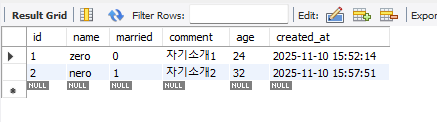
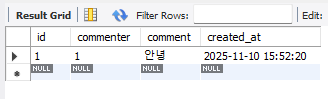
- 명령어를 이용해 데이터를 생성할 수 있음
2) Read
- SELECT를 통해 테이블 조회가능
mysql> SELECT [조회하려는 컬럼명] FROM [테이블명];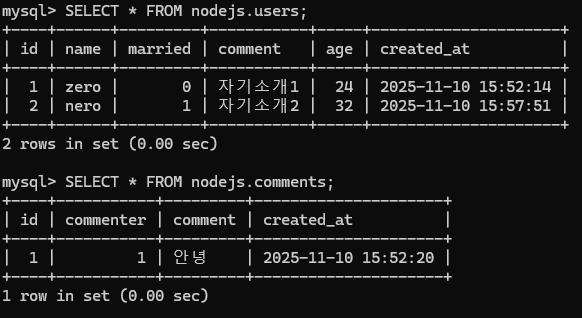
- WHERE로 특정 조건을 만족하는 데이터만 조회 가능
mysql> SELECT [조회하려는 컬럼명] FROM [테이블명] WHERE [조건절];
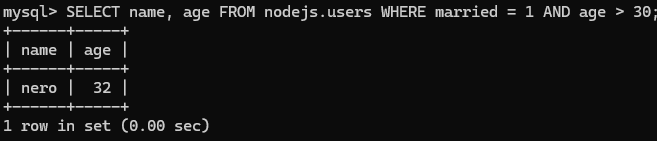
- ORDER BY 로 정렬 가능
- ASC : 오름차순 / DESC : 내림차
mysql> SELECT [조회하려는 컬럼명] FROM [테이블명] ORDER BY [컬럼명] [ASC|DESC];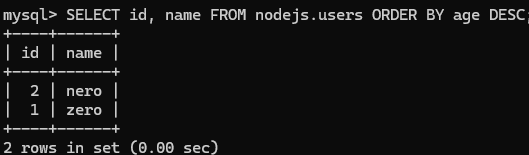
- LIMIT : 조회 로우 개수 설정
mysql> SELECT [조회하려는 컬럼명] FROM [테이블명] LIMIT [숫자];
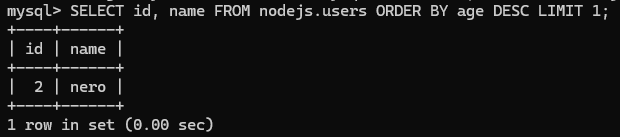
- OFFSET: 몇개를 건너뛸지 지정
mysql> SELECT [조회하려는 컬럼명] FROM [테이블명] LIMIT [숫자] OFFSET [건너뛸 숫자];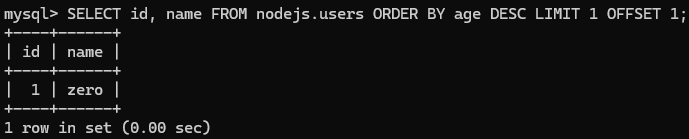
3) Update
mysql> UPDATE [테이블명] SET [컬럼명=바꿀 값] WHERE [조건]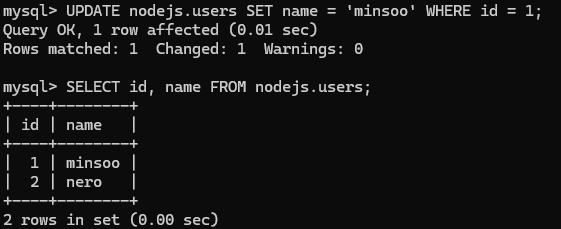
- users 테이블의 id가 1인 row의 name column의 값을 'minsoo'로 변경
4) Delete
mysql> DELETE FROM [테이블명] WHERE [조건]

- users 테이블의 id가 2인 row를 삭제
7. 시퀄라이즈
1) 데이터 베이스 연결
- 노드에서 MySQL 데이터베이스에 접속.
- 시퀄라이즈 라이브러리를 이용하면, JavaScript 구문을 알아서 SQL로 바꿔줌
- ORM(Object-relational Mapping)에 해당
- JS만으로 MySQL 조작 가능
// app.js

const express = require('express');
const path = require('path');
const morgan = require('morgan');
const nunjucks = require('nunjucks');

const { sequelize } = require('./models');

const app = express();
app.set('port', process.env.PORT || 3001);
app.set('view engine', 'html');
nunjucks.configure('views', {
  express: app,
  watch: true,
});
sequelize.sync({ force: false }) // 서버 실행시 MySQL과 연동되도록 함
  .then(() => {
    console.log('데이터베이스 연결 성공');
  })
  .catch((err) => {
    console.error(err);
  });

app.use(morgan('dev'));
app.use(express.static(path.join(__dirname, 'public')));
app.use(express.json());
app.use(express.urlencoded({ extended: false }));

app.use((req, res, next) => {
  const error =  new Error(`${req.method} ${req.url} 라우터가 없습니다.`);
  error.status = 404;
  next(error);
});

app.use((err, req, res, next) => {
  res.locals.message = err.message;
  res.locals.error = process.env.NODE_ENV !== 'production' ? err : {};
  res.status(err.status || 500);
  res.render('error');
});

app.listen(app.get('port'), () => {
  console.log(app.get('port'), '번 포트에서 대기 중');
});- 연동시 config 폴더의 config.json의 정보가 사용됨
 config/config.json
{
  "development": {
    "username": "root",
    "password": "[root 비밀번호]",
    "database": "nodejs",
    "host": "127.0.0.1",
    "dialect": "mysql"
  },
...
}- 이후 서버 실행시 3001번 포트에서 서버 돌아감
[nodemon] 2.0.16
[nodemon] to restart at any time, enter `rs`
[nodemon] watching dir(s): *.*
[nodemon] watching extensions: js,mjs,json
[nodemon] starting `node app.js`
3001 번 포트에서 대기 중
Executing (default): SELECT 1+1 AS result
데이터베이스 연결 성공- 이와 같은 로그가 뜰 시 연결 성공
- 연결 실패시 아래와 같은 에러 발생
- Error: connect ECONNREFUSED 127.0.0.1:3306
- MySQL 데이터베이스 실행하지 않음
- Error: Access denied for user 'root'@'localhost' (using password: YES)
- 비밀번호 틀림
- Error: Unknown database
- 존재하지 않는 데이터베이스
- Error: connect ECONNREFUSED 127.0.0.1:3306
2) 모델 정의
- MySQL에서 정의한 테이블을 시퀄라이즈에서도 정의
- MySQL에서 정의한 테이블은 시퀄라이즈의 모델과 대응
- 모델이름은 단수형 / 테이블 이름은 복수형
//models/user.js
const Sequelize = require('sequelize');

class User extends Sequelize.Model {
  static initiate(sequelize) {
    User.init({
      name: {
        type: Sequelize.STRING(20),
        allowNull: false,
        unique: true,
      },
      age: {
        type: Sequelize.INTEGER.UNSIGNED,
        allowNull: false,
      },
      married: {
        type: Sequelize.BOOLEAN,
        allowNull: false,
      },
      comment: {
        type: Sequelize.TEXT,
        allowNull: true,
      },
      created_at: {
        type: Sequelize.DATE,
        allowNull: false,
        defaultValue: Sequelize.NOW,
      },
    }, {
      sequelize,
      timestamps: false,
      underscored: false,
      modelName: 'User',
      tableName: 'users',
      paranoid: false,
      charset: 'utf8',
      collate: 'utf8_general_ci',
    });
  }

  static associate(db) {
   db.User.hasMany(db.Comment, { foreignKey: 'commenter', sourceKey: 'id' });
  }
};

module.exports = User;
//models/comment.js
const Sequelize = require('sequelize');
class Comment extends Sequelize.Model {
static initiate(sequelize) {
Comment.init({
comment: {
type: Sequelize.STRING(100),
allowNull: false,
},
created_at: {
type: Sequelize.DATE,
allowNull: true,
defaultValue: Sequelize.NOW,
},
}, {
sequelize,
timestamps: false,
modelName: 'Comment',
tableName: 'comments',
paranoid: false,
charset: 'utf8mb4',
collate: 'utf8mb4_general_ci',
});
}
static associate(db) {
db.Comment.belongsTo(db.User, { foreignKey: 'commenter', targetKey: 'id' });
}
};
module.exports = Comment;- static initate 메서드
- 테이블에 대한 설정
- [모델].init( {테이블 컬럼 설명}, {테이블 자체에 대한 설명} )
- id를 기본 키로 연결
- MySQL의 테이블과 컬럼 내용이 일치해야 정확하게 대응됨
| MySQL | VARCHAR | INT | TINYINT | DATETIME | INT + UNSIGNED | INT + UNSIGNED + ZEROFILL |
| 시퀄라이저 | STRING | INTEGER | BOOLEAN | DATE | INTEGER.UNSIGNED | INTEGER.UNSIGNED .ZEROFILL |
| MySQL | NOT NULL | UNIQUE | DEFEALT now() |
| 시퀄라이저 | allowNull : false | unique : true | defaultValue : Sequelize.NOW |
- static associate 메서드 (관계 정의 파트에서 후술)
- 다른 모델과의 관계 정의
//models/user.js
db.User.hasMany(db.Comment, { foreignKey: 'commenter', sourceKey: 'id' });

//models/commnet.js
db.Comment.belongsTo(db.User, { foreignKey: 'commenter', targetKey: 'id' });
//models/index.js
const Sequelize = require('sequelize');
const User = require('./user');
const Comment = require('./comment');
...
db.sequelize = sequelize;

db.User = User;
db.Comment = Comment;

User.initiate(sequelize);
Comment.initiate(sequelize);

User.associate(db);
Comment.associate(db);

module.exports = db;- db라는 객체에 User와 Comment 모델을 담음
- db 객체를 require해서 User와 Comment 모델에 접근 가능
3) 관계 정의
- 일대다 관계
- 사용자와 댓글 테이블의 관계
- hasMany 메서드로 표현
- users 테이블의 로우 하나를 불러올 때 연결된 comments 테이블의 로우들도 같이 불러올 수 있음
- comments 테이블의 로우를 불러올 때 연결된 users 테이블의 로우를 가져올 수 있음
//models/user.js
db.User.hasMany(db.Comment, { foreignKey: 'commenter', sourceKey: 'id' });

//models/commnet.js
db.Comment.belongsTo(db.User, { foreignKey: 'commenter', targetKey: 'id' });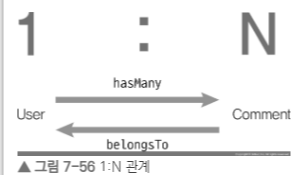
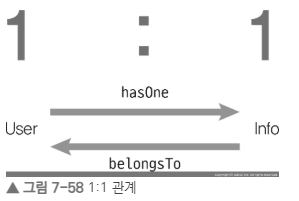
- 일대일 관계
- 사용자와 사용자에 대한 정보 테이블의 관계
- hasOne 메서드로 표현
- belongsTo를 사용하는 모델(info)에 UserId 컬럼이 추가
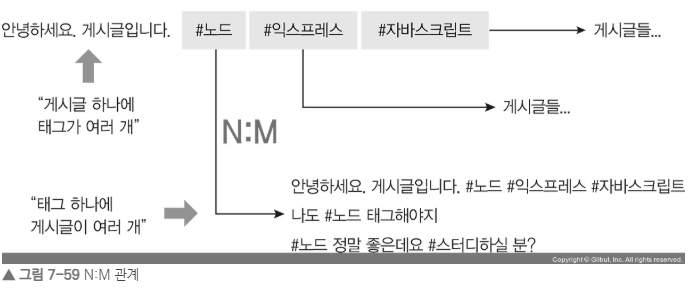
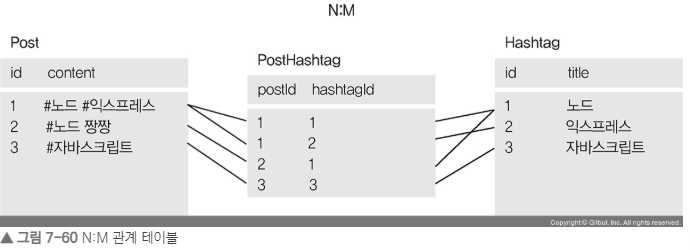
- 다대다 관계
- 게시글 테이블과 해시태그 테이블 관계
- belongsToMany 메서드로 표현
4) 시퀄라이즈 쿼리
- 시퀄라이즈로 CRUD 작업
(1) Create
INSERT INTO nodejs.users (name, age, married, comment) VALUES ('zero', 24, 0, '자기소개1');const { User } = require('../models');
User.create({
name: 'zero',
age: 24,
married: false,
comment: '자기소개1',
});- 데이터를 넣을 때 MySQL의 자료형이 아니라 시퀄라이즈 모델에 정의한 자료형대로 넣어야 함.
- married가 시퀄라이즈 모델에서 boolean 타입으로 정의 되어 있어, false가 기입됨
- 자료형이 부합하지 않는 데이터가 입력 될 시 시퀄라이즈가 에러를 발생 시킴
(2) Read
- 테이블의 모든 데이터 조회
SELECT * FROM nodejs.users;User.findAll({});
- 데이터 하나만 조회
SELECT * FROM nodejs.users LIMIT 1;User.findOne({});
- 조회할 로우 개수 설정
SELECT id, name FROM users ORDER BY age DESC LIMIT 1 OFFSET 1;User.findAll({
attributes: ['id', 'name'],
order: ['age', 'DESC'],
limit: 1,
offset: 1,
});
- attributes 옵션을 사용해서 원하는 컬럼만 조회
SELECT name, married FROM nodejs.users;User.findAll({
attributes: ['name', 'married'],
});
- where을 이용해 조건으로 필터링
SELECT name, age FROM nodejs.users WHERE married = 1 AND age > 30;const { Op } = require('sequelize');
const { User } = require('../models');
User.findAll({
attributes: ['name', 'age'],
where: {
married: true,
age: { [Op.gt]: 30 },
},
});- undefined는 지원하지 않음 null을 대신 사용
- Sequelize 객체 내부의 Op 객체를 불러와 사용 , 튿수 연산
- Op.gt(초과), Op.gte(이상), Op.lt(미만), Op.lte(이하), Op.ne(같지 않음), Op.or(또는), Op.in(배열 요소 중 하나), Op.notIn(배열 요소와 모두 다름)
- 정렬
SELECT id, name FROM users ORDER BY age DESC;User.findAll({
attributes: ['id', 'name'],
order: [['age', 'DESC']],
});- order 옵션을 이용해, 정렬 가능
(3) Update
UPDATE nodejs.users SET comment = '바꿀 내용' WHERE id = 2;User.update({
comment: '바꿀 내용',
}, {
where: { id: 2 },
});
(4) Delete
DELETE FROM nodejs.users WHERE id = 2;User.destory({
where: { id: 2 },
});- where 옵션에 조건을 적어 삭제 할 수 있음
5) 관계 쿼리
- 현재 예제에서 특정 사용자를 가져오면서, 그 사람의 댓글까지 가져오고 싶을 때 include 속성 이용
const user = await User.findOne({
  include: [{
    model: Comment,
  }]
});
console.log(user.Comments); // 사용자 댓글

const user = await User.findOne({});
const comments = await user.getComments();
console.log(comments); // 사용자 댓글- 두 모델간의 관계를 설정 했다면 아래와 같은 메서드를 지원
- get[모델명]()
- set[모델명]()
- add[모델명]()
- remove[모델명]()
- as 속성을 추가해, 메서드 뒤에 들어가는 모델명을 따로 지정해 줄 수도 있음.
- 관계 쿼리 생성시 배열로 추가/삭제 가능
5) SQL 쿼리
- 직접 SQL문을 이용해 쿼리 가능
- 되도록 시퀄라이즈 쿼리로 처리하는 것을 지향
const [result, metadata] = await sequelize.query('SELECT * from comments');
console.log(result);
8. 쿼리 수행
1) 모델에서 데이터를 받아 페이지 렌더링
//public/sequelize.js

// 사용자 이름을 눌렀을 때 댓글 로딩
document.querySelectorAll('#user-list tr').forEach((el) => {
  el.addEventListener('click', function () {
    const id = el.querySelector('td').textContent;
    getComment(id);
  });
});
// 사용자 로딩
async function getUser() {
  try {
    const res = await axios.get('/users');
    const users = res.data;
    console.log(users);
    const tbody = document.querySelector('#user-list tbody');
    tbody.innerHTML = '';
    users.map(function (user) {
      const row = document.createElement('tr');
      row.addEventListener('click', () => {
        getComment(user.id);
      });
      // 로우 셀 추가
      let td = document.createElement('td');
      td.textContent = user.id;
      row.appendChild(td);
      td = document.createElement('td');
      td.textContent = user.name;
      row.appendChild(td);
      td = document.createElement('td');
      td.textContent = user.age;
      row.appendChild(td);
      td = document.createElement('td');
      td.textContent = user.married ? '기혼' : '미혼';
      row.appendChild(td);
      tbody.appendChild(row);
    });
  } catch (err) {
    console.error(err);
  }
}
// 댓글 로딩
async function getComment(id) {
  try {
    const res = await axios.get(`/users/${id}/comments`);
    const comments = res.data;
    const tbody = document.querySelector('#comment-list tbody');
    tbody.innerHTML = '';
    comments.map(function (comment) {
      // 로우 셀 추가
      const row = document.createElement('tr');
      let td = document.createElement('td');
      td.textContent = comment.id;
      row.appendChild(td);
      td = document.createElement('td');
      td.textContent = comment.User.name;
      row.appendChild(td);
      td = document.createElement('td');
      td.textContent = comment.comment;
      row.appendChild(td);
      const edit = document.createElement('button');
      edit.textContent = '수정';
      edit.addEventListener('click', async () => { // 수정 클릭 시
        const newComment = prompt('바꿀 내용을 입력하세요');
        if (!newComment) {
          return alert('내용을 반드시 입력하셔야 합니다');
        }
        try {
          await axios.patch(`/comments/${comment.id}`, { comment: newComment });
          getComment(id);
        } catch (err) {
          console.error(err);
        }
      });
      const remove = document.createElement('button');
      remove.textContent = '삭제';
      remove.addEventListener('click', async () => { // 삭제 클릭 시
        try {
          await axios.delete(`/comments/${comment.id}`);
          getComment(id);
        } catch (err) {
          console.error(err);
        }
      });
      // 버튼 추가
      td = document.createElement('td');
      td.appendChild(edit);
      row.appendChild(td);
      td = document.createElement('td');
      td.appendChild(remove);
      row.appendChild(td);
      tbody.appendChild(row);
    });
  } catch (err) {
    console.error(err);
  }
}
// 사용자 등록 시
document.getElementById('user-form').addEventListener('submit', async (e) => {
  e.preventDefault();
  const name = e.target.username.value;
  const age = e.target.age.value;
  const married = e.target.married.checked;
  if (!name) {
    return alert('이름을 입력하세요');
  }
  if (!age) {
    return alert('나이를 입력하세요');
  }
  try {
    await axios.post('/users', { name, age, married });
    getUser();
  } catch (err) {
    console.error(err);
  }
  e.target.username.value = '';
  e.target.age.value = '';
  e.target.married.checked = false;
});
// 댓글 등록 시
document.getElementById('comment-form').addEventListener('submit', async (e) => {
  e.preventDefault();
  const id = e.target.userid.value;
  const comment = e.target.comment.value;
  if (!id) {
    return alert('아이디를 입력하세요');
  }
  if (!comment) {
    return alert('댓글을 입력하세요');
  }
  try {
    await axios.post('/comments', { id, comment });
    getComment(id);
  } catch (err) {
    console.error(err);
  }
  e.target.userid.value = '';
  e.target.comment.value = '';
});
// routes/users.js
const express = require('express');
const User = require('../models/user');
const Comment = require('../models/comment');
const router = express.Router();
router.route('/')
.get(async (req, res, next) => {
try {
const users = await User.findAll();
res.json(users);
} catch (err) {
console.error(err);
next(err);
}
})
.post(async (req, res, next) => {
try {
const user = await User.create({
name: req.body.name,
age: req.body.age,
married: req.body.married,
});
console.log(user);
res.status(201).json(user);
} catch (err) {
console.error(err);
next(err);
}
});
router.get('/:id/comments', async (req, res, next) => {
try {
const comments = await Comment.findAll({
include: {
model: User,
where: { id: req.params.id },
},
});
console.log(comments);
res.json(comments);
} catch (err) {
console.error(err);
next(err);
}
});
module.exports = router;- 사용자 등록과 조회하는 요청을 처리
// routes/comments.js

const express = require('express');
const { Comment } = require('../models');

const router = express.Router();

router.post('/', async (req, res, next) => {
  try {
    const comment = await Comment.create({
      commenter: req.body.id,
      comment: req.body.comment,
    });
    console.log(comment);
    res.status(201).json(comment);
  } catch (err) {
    console.error(err);
    next(err);
  }
});

router.route('/:id')
  .patch(async (req, res, next) => {
    try {
      const result = await Comment.update({
        comment: req.body.comment,
      }, {
        where: { id: req.params.id },
      });
      res.json(result);
    } catch (err) {
      console.error(err);
      next(err);
    }
  })
  .delete(async (req, res, next) => {
    try {
      const result = await Comment.destroy({ where: { id: req.params.id } });
      res.json(result);
    } catch (err) {
      console.error(err);
      next(err);
    }
  });

module.exports = router;
- 댓글 관련 CRUD 작업을 하는 라우터
<빈칸QUIZ>
- 서버가 종료되어도 데이터가 사라지지 않게 하기 위해, 변수 대신 _____를 이용한다.
- 데이터를 생성(Create), 조회(Read), 수정(Update), 삭제(Delete)하는 작업을 통칭하여 _____(이)다.
- 다른 테이블의 기본키를 저장하는 컬럼으로, 테이블 간의 관계를 정의하는 데 사용되는 키는 _____(이)다.
- Node.js에서 JavaScript 구문을 SQL로 자동 변환해주는 ORM(Object-relational Mapping) 라이브러리의 이름은 _____(이)다.
- 시퀄라이즈(Sequelize)에서 SELECT * FROM users;와 같이 테이블의 모든 데이터를 조회하는 메서드는 User.____({}); 이다.
<코드작성QUIZ>
- nodejs.users 테이블에 name이 'neo', age가 30, married가 0인 사용자를 추가하는 SQL 쿼리를 작성하세요. (id, comment, created_at는 제외)
- 시퀄라이즈(Sequelize)를 사용하여 User 모델에서 id가 1인 사용자의 comment를 '수정된 자기소개'로 변경하는 JavaScript 코드를 한 줄로 작성하세요.
<빈칸QUIZ 답>
- DB (또는 데이터베이스)
- CRUD
- 외래키 (또는 foregn key)
- 시퀄라이즈 (또는 Sequelize)
- findAll
<코드작성QUIZ 답>
1.
INSERT INTO nodejs.users (name, age, married) VALUES ('neo', 30, 0);
2.
User.update({ comment: '수정된 자기소개' }, { where: { id: 1 } });
출처 : 조현영, 『 Node.js 교과서 개정 3판』, 길벗(2022)
Corner Node.js 2
Editor Arom
728x90
'25-26 > Node.js 2' 카테고리의 다른 글
| [Node.js 2팀] 9장 익스프레스로 SNS 서비스 만들기 (0) | 2025.11.28 |
|---|---|
| [Node.js 2팀] 8장. 몽고디비 (0) | 2025.11.21 |
| [Node.js 2팀] 5장. 패키지 매니저~ 6장. 익스프레스 웹 서버 만들기 (0) | 2025.11.07 |
| [Node.js 2팀] 3장. 노드 기능 알아보기 ~ 4장. http 모듈로 서버 만들기 (0) | 2025.10.31 |
| [Node.js 2팀] 1장. 노드 시작하기 ~ 2장. 알아둬야 할 JavaScript (0) | 2025.10.10 |