고정 헤더 영역
상세 컨텐츠
본문
728x90

1. 유효성 검사 개요
1) 유효성 검사란
- 폼 페이지 -> 서버로 전송될 때, 유효한 데이터가 전송되는지 검사
- 유효성 검사 필수적인 폼 데이터
- 입력 데이터 null
- 날짜, 이메일 형식
- 나이를 숫자로 입력
- 입력 데이터의 제한 길이
- 로그인 인증 시 아이디, 패스워드 유효
- 회원가입 시 입력 아이디 중복
2) 유효성 검사 설정
- @Valid 애너테이션 이용
- 의존 라이브러리 등록 : bulid.gradle 파일에 validation 의존 라이브러리 추가
- @Valid 설정 : 요청 처리 메서드에 @Valid 선언
3) 유효성 검사 유형
- Bean Validation : 도메인 클래스 멤버 변수 -> 제약사항 애너테이션 선언
- ConstraintValidator : 도메인 클래스 멤버 변수 -> 사용자 정의 애너테이션 선언
- Validator : 모든 계층 -> Validation 인터페이스
2. 유효성 검사 - Bean Validation
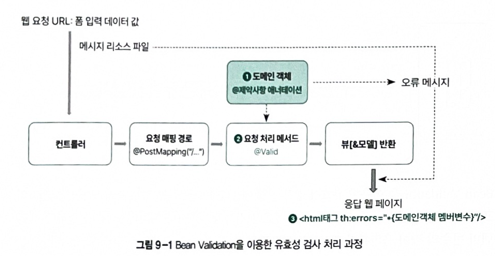
1. Bean Validation 유효성 검사
- 도메인 클래스 멤버 변수(필드) -> 유효성 검사 제약사항 애너테이션
- 유효성 검사 처리 과정
- 제약사항 애너테이션 선언
- 유효성 검사 실행
- 오류 메세지 출력
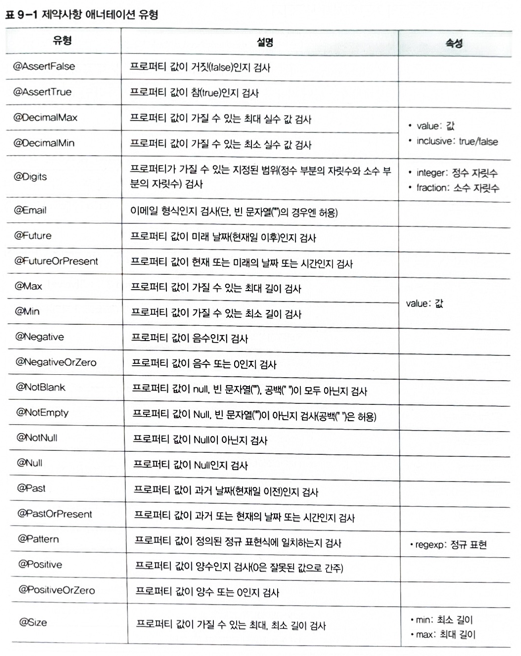
2. 제약사항 애너테이션
- 제약사항 애너테이션 유형
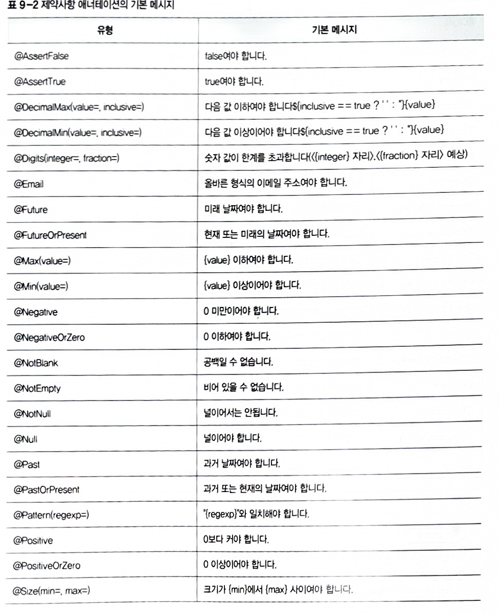
- 기본 메세지 사용
- hibemate-validator-xxx.jar 라이브러리 기본 메세지 제공
// domain

@Data
public class Product {

	@NotEmpty
	@Size(min=4, max=10)
	//@Size(min=4, max=10)
	private String name;

	@Min(value=0)
	private int price;

}
// controller
@PostMapping
public String submit(@Valid @ModelAttribute Product product, BindingResult bindingResult){
if(bindingResult.hasErrors())
return "viewPage01";
return "viewPage01_result";
}< !--viewPage01.html-->
<body>
<h3>유효성 검사</h3>
<form th:object="${product}" action="/exam01" method="post">
<p>품명 : <input type="text" th:field="*{name}"> <span th:errors="*{name}"></span>
<p>가격 : <input type="text" th:field="*{price}"> <span th:errors="*{price}"></span>
<p><input type="submit" value="확인"/>
<input type="reset" value="취소"/>
</form>
</body>
//viewPage_result01.html
<body>
<h3>유효성 검사</h3>
<p>품명 : [[${product.name}]]
<p>가격 : [[${product.price}]]
</body>< !--viewPage01_result.html-->
<body>
<h3>유효성 검사</h3>
<p>품명 : [[${product.name}]]
<p>가격 : [[${product.price}]]
</body>
- 사용자 정의 오류 메세지 사용
- message 속성 값에 오류 메세지 직접 정의
//messages
NotEmpty.product.name = 값을 입력해 주세요
Min.product.price = 0 이상의 값을 입력해 주세요
// application
spring.messages.basename=messages
spring.messages.encoding=UTF-8// domain
@Data
public class Product {
@NotEmpty
@Size(min=4, max=10, message="4자~10자 이내로 입력해 주세요")
private String name;
@Min(value=0)
private int price;
}< !--viewPage02.html-->
<body>
<h3>유효성 검사</h3>
<form th:object="${product}" action="/exam02" method="post">
<p>품명 : <input type="text" th:field="*{name}"> <span th:errors="*{name}"></span>
<p>가격 : <input type="text" th:field="*{price}"> <span th:errors="*{price}"></span>
<p><input type="submit" value="확인"/>
<input type="reset" value="취소"/>
</form>
</body>< !--viewPage02.html-->
<body>
<h3>유효성 검사</h3>
<p>품명 : [[${product.name}]]
<p>가격 : [[${product.price}]]
</body>3. 유효성 검사 - ConstraintValidator
1. ConstraintValidator 유효성 검사
- 프로퍼티 값 중복 확인 가능
- 사용자 정의 애너테이션 정의하는 것 제외하고 Bean Validation 유효성 검사와 동일
- 유효성 검사 처리 과정
- 사용자 정의 애너테이션 선언 (@interface, ConstraintValidator 구현체)
- 유효성 검사
- 오류 메세지
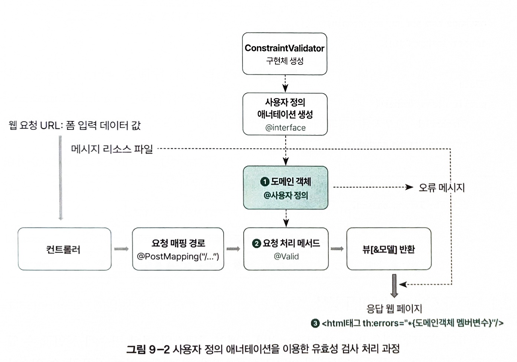
2. 사용자 정의 애너테이션 생성
// domain

@Target({ElementType.FIELD, ElementType.ANNOTATION_TYPE })
@Retention(RetentionPolicy.RUNTIME)
@Constraint(validatedBy = MemberIdValidator.class) // ConstraintValidator 인터페이스 구현체
public @interface MemberId{
   String message() default "중복된 아이디입니다";

    Class<?>[] groups() default {};

    Class<?>[] payload() default {};
}- @Constraint : 제약사항을 생성하는 애너테이션

- @Retention : 지속 시간 결정

- @Target : 적용 위치 결정
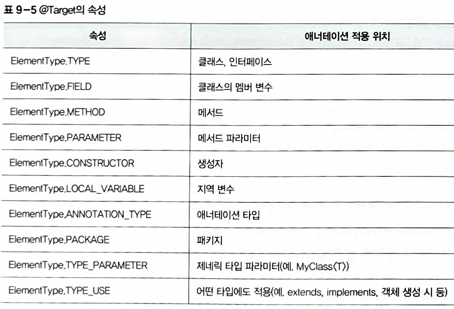
3. 구현체 생성
- ConstraintValidator 구현체 -> 유효성 검사 클래스
- initialize() -> 사용자 정의 애너테이션 정보 초기화
- isValid() -> 유효성 검사 로직 수행
// domain

public class MemberIdValidator implements ConstraintValidator<MemberId, String>{ // 사용자 정의 애너테이션, 도메인 클래스 멤버 변수 타입

	@Override
	public void initialize(MemberId constraintAnnotation) {
		ConstraintValidator.super.initialize(constraintAnnotation);
	}

	@Override
	public boolean isValid(String value, ConstraintValidatorContext context) {
		 if(value.equals("admin")) {
	         return false; // 오류 발생하면 false
	      }

	     return true;

	}

}
// controller

@PostMapping
	public String submit(@Valid @ModelAttribute Member member, BindingResult bindingResult){

		if(bindingResult.hasErrors())
			return "viewPage03";

		return "viewPage03_result";
	}
< !--viewPage03.html-->
<body>
<h3>유효성 검사</h3>
<form th:object="${member}" action ="/exam03" method="post">
<p>아이디 : <input type="text" name="memberId" th:field="*{memberId}" /> <span th:errors="*{memberId}"></span>
<p>비밀번호 : <input type="text" name="passwd" th:field="*{passwd}" /> <span th:errors="*{passwd}"></span>
<p><input type="submit" value="확인"/>
<input type="reset" value="취소"/>
</form>
</body>< !--viewPage03_result.html-->
<body>
<h3>유효성 검사</h3>
<p>품명 : [[${member.memberId}]]
<p>가격 : [[${member.passwd}]]
</body>4. 유효성 검사 - Validator
1. Validator 유효성 검사
- Validator 인터페이스
- 유효성 검사 처리 과정
- Validator 인터페이스 구현체 생성
- @InitBinder 메서드 추가
- 유효성 검사
- 오류 메시지 출력
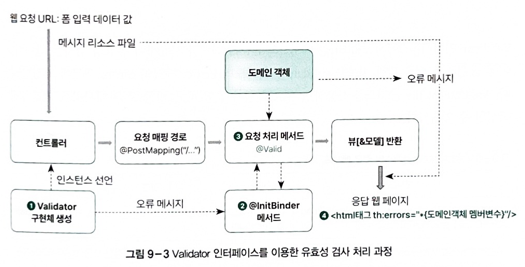
2. 구현체 생성
- Validator 구현체 -> 유효성 검사 클래스
- supports() -> 지정된 객체에 대해 유효성 검사 수행 가능한지
- validate() -> 지정된 객체에 유효성 검사 수행, errors 객체에 오류 정보 저장
- validationUtils 클래스 : 오류 메세지 편리하게 작성
- rejectEmpty
- rejectEmptyOrWhitespace()
// domain

@Data
public class Person {


    private String name;

    private String age;

    private String email;

}
// domain
@Component
public class PersonValidator implements Validator{
@Override
public boolean supports(Class<?> clazz) {
return Person.class.isAssignableFrom(clazz);
}
@Override
public void validate(Object target, Errors errors) {
Person person = (Person) target;
if(person.getName() == null || person.getName().trim().isEmpty())
ValidationUtils.rejectIfEmptyOrWhitespace(errors, "name", null, "이름을 입력하세요");
if(person.getAge() == null || person.getAge().trim().isEmpty())
ValidationUtils.rejectIfEmptyOrWhitespace(errors, "age", null, "나이를 입력하세요");
if( person.getEmail() == null || person.getEmail().trim().isEmpty())
ValidationUtils.rejectIfEmptyOrWhitespace(errors, "email", null, "이메일을 입력하세요");
}
}
3. @initBinder
- WebDataBinder를 초기화하고 사용자 정의 바인딩 로직을 설정 -> validator 인터페이스 구현체 설정
// controller

@Controller
@RequestMapping("/exam04")
public class Example04Controller {

	 @Autowired
	private PersonValidator personValidator;

	@GetMapping
	public String showForm(Model model) {
		model.addAttribute("person", new Person());
		return "viewPage04";
	}

	@PostMapping
	public String submit(@Valid @ModelAttribute Person person,BindingResult bindingResult)		{

		//personValidator.validate(person, bindingResult);

		if (bindingResult.hasErrors())
			return "viewPage04";


		return "viewPage04_result";
	}

	 @InitBinder
	    protected void initBinder(WebDataBinder binder) {
	        binder.setValidator(personValidator);
	    }

}
< !--viewPage04.html-- >
<body>
<h3>유효성 검사</h3>
<form th:object="${person}" action ="/exam04" method="post">
<p>이름 : <input type="text" name="name" th:field="*{name}" /> <span th:errors="*{name}"></span>
<p>나이 : <input type="text" name="age" th:field="*{age}" /> <span th:errors="*{age}"></span>
<p>이메일 : <input type="text" name="email" th:field="*{email}" /> <span th:errors="*{email}"></span>
<p><input type="submit" value="확인"/>
<input type="reset" value="취소"/>
</form>
</body>< !--viewPage04_result-- >
<body>
<h3>유효성 검사</h3>
<p>이름 : [[${person.name}]]
<p>나이 : [[${person.age}]]
<p>이메일 : [[${person.email}]]
</body>출처: 송미영,『 스프링 부트 완전 정복 』, 길벗(2024).
Coner Spring1
Editor: soyee
728x90
'25-26 > Spring' 카테고리의 다른 글
| [Spring 1팀] 11-12장. 예외 처리 & 로그 기록 (0) | 2025.12.26 |
|---|---|
| [Spring 1팀] 10장. 시큐리티 처리 (0) | 2025.12.19 |
| [Spring 1팀] 8장. 다국어 처리 (0) | 2025.11.21 |
| [Spring 1팀] 7장. 파일 업로드 처리 (0) | 2025.11.14 |
| [Spring 1팀] 6장. 폼 태그 (1) | 2025.11.07 |