
고정 헤더 영역
상세 컨텐츠
본문
728x90

1. 스프링 시큐리티의 개요
- 시큐리티: 허가된 사용자만 특정 웹페이지에 접근할 수 있도록 제한하는 보안 기능을 쉽게 구현할 수 있다.
1.1 스프링 시큐리티
- 스프링 시큐리티: 스프링을 기반으로 하는 애플리케이션에서 보안을 담당하는 프레임워크.
- 로그인 및 로그아웃 기능
- 인증 및 승인
- 사용자의 URL 접근 허용 또는 차단
- OAuth 구현
- 통합 인증, 경량 디렉터리 액세스 프로포콜 구현
- 역할 기반 액세스 제공
1.2 기본 설정
- Build.gradle파일에 의존 라이브러리를 등록해야 합니다.
dependencies {
    implementation 'org.thymeleaf.extras:thymeleaf-extras-springsecurity6'
}
2. 시큐리티 세부 구성 설정
@Configuration
@EnableWebSecurity
public class 클래스 이름 {
    @Bean
    // 클래스 세부 사항
}
시큐리티 구성에 주로 등록하는 빈 유형
| 유형 | 설명 |
| UserDetailsService | 사용자 정보를 가져오는 역할 |
| PasswordEncoder | 비밀번호를 암호화하는 역할 |
| SecurityFilterChain | 실제 보안 필터 체인을 구성하는 데 사용하며 여러 보안 필터가 어떤 순서로 실행될지 결정하고 보안과 관련한 요청 처리 담당 |
| WebSecurityCustomizer | 보안 구성을 조정하고 보안 설정을 사용자 정의하는 데 사용 |
2.1 접근 권한 설정
- httpSecurity는 시큐리티 설정에 필요한 모든 기능을 제공하는 클래스
| 메서드 | 설명 |
| authorizeHttpRequests() | HTTP 요청 인가를 설정 |
| requestMatchers() | 특정 리소스(경로, URL 패턴)에 대한 인가를 설정 |
| anyRequest() | 모든 리소스에 대한 인가를 설정 |
| authenticated() | 인증된 사용자의 접근을 허용 |
| fullyAuthenticated() | 인증된 사용자의 접근은 허용, rememberMe 인증은 제외 |
| permitAll() | 인증 없이 모든 사용자의 접근을 허용 |
| denyAll() | 무조건 접근을 허용하지 않음 |
| anonymous() | 익명 사용자의 접근을 허용 |
| rememberMe() | 기억하기를 통해 인증된 사용자의 접근을 허용 |
| access(String) | 지정된 SpEL 표현식에 적합하면 접근을 허용 |
| hasRole(String role) | 지정된 역할을 가진 사용자의 접근을 허용 |
| hasAnyRole(String ... roles) | 지정된 역할 중 어떤 것이라도 가진 사용자의 접근을 허용 |
| hasAuthority(String authority) | 지정된 권한을 가진 사용자의 접근을 허용 |
| hasAnyAuthority(String ... authorities) | 지정된 권한 중 어떤 것이라도 가진 사용자의 접근을 허용 |
| hasIpAddress(String) | 지정된 IP로부터 요청이 있으면 접근을 허용 |
@Configuration
@EnableWebSecurity
public class SecurityConfiguration {

    @Bean
    SecurityFilterChain securityFilterChain(HttpSecurity http) throws Exception {

        http.authorizeHttpRequests(
            authorizeHttpRequests -> authorizeHttpRequests
                .requestMatchers("/admin/**").hasAuthority("ROLE_ADMIN")   // 1
                .requestMatchers("/manager/**").hasRole("MANAGER")         // 2
                .requestMatchers("/member/**").authenticated()             // 3
                .anyRequest().permitAll()                                  // 4
        );

        return http.build();
    }
}
더보기
- 웹 요청 URL이 http://.../admin 또는 http://.../admin/main이면 ROLE_ADMIN 권한이 있는 사용자만 접근이 가능합니다.
- 웹 요청 URL이 http://.../manager/ 또는 http://.../manager/main이면 MANAGER 권한이 있는 사용자만 접근이 가능합니다.
- 웹 요청 URL이 http://.../member 또는 http://.../member/main이면 인증된 사용자만 접근이 가능합니다.
- 그 외 요청은 모두 접근 허용(permitAll)입니다.
2.2 사용자 정보 설정
- 사용자 정보를 저장하기 위해 UserDetails 인터페이스를 사용합니다.
@Configuration
@EnableWebSecurity
public class SecurityConfiguration {

    @Bean
    public UserDetailsService userDetailsService() {
        UserDetails admin = User.builder()
                .username("admin")      // 사용자 이름(계정)
                .password("admin123")   // 사용자 비밀번호
                .roles("ADMIN")         // 사용자 권한
                .build();

        return new InMemoryUserDetailsManager(admin);
    }
}
2.3 사용자 비밀번호의 암호화 설정
- 사용자 정보 설정에서 사용자 비밀번호를 안전하게 저장할 수 있도록 비밀번호의 단방향 암호화를 지원하는 PasswordEncoder 인터페이스를 빈으로 등록합니다.
@Configuration
@EnableWebSecurity
public class SecurityConfiguration {

    @Bean
    public PasswordEncoder passwordEncoder() {
        return new BCryptPasswordEncoder(); // BCrypt 해시 암호화 방식
    }

    @Bean
    public UserDetailsService userDetailsService() {
        UserDetails admin = User.builder()
                .username("admin")
                .password(passwordEncoder().encode("admin123"))
                .roles("ADMIN")
                .build();
        return new InMemoryUserDetailsManager(admin);
    }
}
package com.springboot.config;

import org.springframework.context.annotation.Bean;
import org.springframework.context.annotation.Configuration;
import org.springframework.security.config.annotation.web.builders.HttpSecurity;
import org.springframework.security.config.annotation.web.configuration.EnableWebSecurity;
import org.springframework.security.crypto.bcrypt.BCryptPasswordEncoder;
import org.springframework.security.crypto.password.PasswordEncoder;
import org.springframework.security.core.userdetails.User;
import org.springframework.security.core.userdetails.UserDetails;
import org.springframework.security.core.userdetails.UserDetailsService;
import org.springframework.security.provisioning.InMemoryUserDetailsManager;
import org.springframework.security.web.SecurityFilterChain;

@Configuration
@EnableWebSecurity
public class SecurityConfig {

    @Bean
    public PasswordEncoder passwordEncoder() {
        return new BCryptPasswordEncoder();
    }

    @Bean
    public UserDetailsService users() {
        UserDetails user = User.builder()
                .username("guest")
                .password(passwordEncoder().encode("g1234"))
                .roles("USER")
                .build();

        UserDetails manager = User.builder()
                .username("manager")
                .password(passwordEncoder().encode("m1234"))
                .roles("MANAGER")
                .build();

        UserDetails admin = User.builder()
                .username("admin")
                .password(passwordEncoder().encode("a1234"))
                .roles("ADMIN")
                .build();

        return new InMemoryUserDetailsManager(user, manager, admin);
    }

    @Bean
    SecurityFilterChain examMethod01(HttpSecurity http) throws Exception {
        http.authorizeHttpRequests(authorize -> authorize
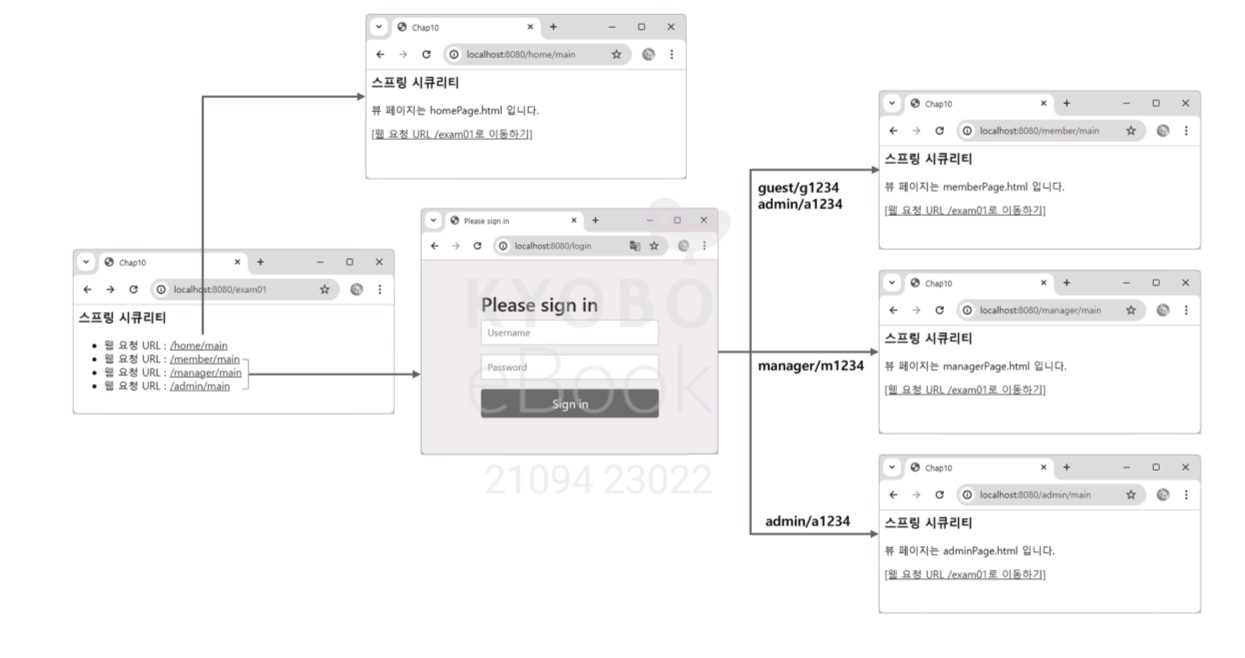
                .requestMatchers("/member/**").hasAnyRole("USER", "ADMIN")
                .requestMatchers("/manager/**").hasRole("MANAGER")
                .requestMatchers("/admin/**").hasRole("ADMIN")
                .anyRequest().permitAll()
        )
        .formLogin(); // 기본 로그인 폼 사용

        return http.build();
    }
}
3. 사용자 정보 검색
3.1 컨트롤러에서 사용자 정보 검색
사용자 정보 검색 방법
| 유형 | 설명 |
| Principal | getName() 메서드로 사용자 정보 가져오기 |
| Authentication | getName() 메서드로 사용자 정보 가져오기 |
| @AuthenticationPrincipal | UserDetails를 구현한 클래스와 UserDetailsService를 사용할 때 사용자 정보 가져오기 |
// Principal 인터페이스 사용 예

import java.security.Principal;

@GetMapping("/manager/user")
public String principalMethod(Principal principal, ...) {
    String username = principal.getName(); // 사용자 이름(계정) 가져오기
    ...
}
// Authentication 인터페이스 사용 예 1
import org.springframework.security.core.Authentication;
@GetMapping("/manager/user")
public String authenticationMethod1(Authentication authentication, ...) {
String username = authentication.getName(); // 사용자 이름(계정) 가져오기
...
}// Authentication 인터페이스 사용 예 2
import org.springframework.security.core.Authentication;
import org.springframework.security.core.userdetails.UserDetails;
@GetMapping("/manager/user")
public String authenticationMethod2(Authentication authentication, ...) {
UserDetails userDetails = (UserDetails) authentication.getPrincipal();
String username = userDetails.getUsername(); // 사용자 이름(계정)
String password = userDetails.getPassword(); // 사용자 비밀번호
String authority = userDetails.getAuthorities().toString(); // 사용자 권한
...
}// @AuthenticationPrincipal 사용 예
import org.springframework.security.core.annotation.AuthenticationPrincipal;
import org.springframework.security.core.userdetails.UserDetails;
@GetMapping("/manager/user4")
public String annotationMethod(@AuthenticationPrincipal UserDetails userDetails, ...) {
String username = userDetails.getUsername(); // 사용자 이름(계정)
String password = userDetails.getPassword(); // 사용자 비밀번호
String authority = userDetails.getAuthorities().toString(); // 사용자 권한
...
}
3.2 뷰 페이지에서 사용자 정보 검색
dependencies {
    implementation 'org.thymeleaf.extras:thymeleaf-extras-springsecurity6'
}
사용자 역할 권한 태그: <sec:authorize>
<!-- 인가 메서드 -->
<HTML 태그 sec:authorize="인가메서드()" />


<!-- 사용자가 설정된 권한일 때 -->
<div sec:authorize="hasRole('ROLE_ADMIN')"></div>

<!-- 사용자가 설정된 권한을 가지고 있지 않을 때 -->
<div sec:authorize="!hasRole('ROLE_ADMIN')"></div>

<!-- 사용자가 둘 중 하나의 권한을 가질 때 -->
<div sec:authorize="hasAnyRole('ROLE_ADMIN','ROLE_MANAGER')"></div>

<!-- 사용자가 로그인 할 때 -->
<div sec:authorize="isAuthenticated()"></div>

<!-- 사용자가 로그인하지 않을 때 -->
<div sec:authorize="isAnonymous()"></div>
사용자 인증 태그: <sec:authentication>
<span sec:authentication="name"/>           <!-- 사용자 이름 -->
<span sec:authentication="authorities"/>    <!-- 사용자 권한 -->
<span sec:authentication="authenticated"/>  <!-- 인증여부 -->
package com.springboot.controller;

import org.springframework.stereotype.Controller;
import org.springframework.ui.Model;
import org.springframework.web.bind.annotation.GetMapping;

@Controller
public class Example04Controller {

    @GetMapping("/exam04")
    public String requestMethod(Model model) {
        return "viewPage04";
    }

    @GetMapping("/admin/tag")
    public String requestMethod2(Model model) {
        return "viewPage04";
    }
}
<html xmlns:sec="http://www.thymeleaf.org/extras/spring-security">
<head>
<title>Chap10</title>
</head>
<body>
<h3>스프링 시큐리티</h3>
<div sec:authorize="hasRole('ROLE_ADMIN')">
<b>관리자 권한 화면입니다.</b>
</div>
<div sec:authorize="isAuthenticated()">
로그인 중입니다.
<p>사용자 이름: <span sec:authentication="name"/></p>
<p>사용자 권한: <span sec:authentication="authorities"/></p>
<p>사용자 인증여부: <span sec:authentication="authenticated"/></p>
<a href="/exam04">웹 요청 URL /exam04로 이동하기</a>
</div>
<div sec:authorize="isAnonymous()">
로그인 중이 아닙니다.
<a href="/admin/tag">웹 요청 URL /admin/tag로 이동하기</a>
</div>
</body>
</html>
4. 로그인과 로그아웃 처리
4.1 로그인 처리
- 스프링 시큐리티는 폼 페이지에서 사용자 이름과 비밀번호를 가져올 때 HTTP 기본 인증 방식과 폼 기반 인증 방식을 지원.
기본 인증 방식
@Configuration
@EnableWebSecurity
public class SecurityConfiguration {

    @Bean
    public SecurityFilterChain examMethod(HttpSecurity http) throws Exception {
        http.authorizeHttpRequests(authorize -> authorize
                .anyRequest().authenticated())
            .httpBasic(Customizer.withDefaults());
        return http.build();
    }
}- 사용자의 username:password 를 Base64 인코딩해 Authorization 헤더에 담아 전송하는 인증 방식입니다.
폼 기반 인증 방식
@Configuration
@EnableWebSecurity
public class SecurityConfiguration {

    @Bean
    public SecurityFilterChain examMethod(HttpSecurity http) throws Exception {
        http.authorizeHttpRequests(authorize -> authorize
                .anyRequest().authenticated())
            .formLogin(Customizer.withDefaults()); // 로그인 성공 및 실패 처리
        return http.build();
    }
}
| 메서드 | 설명 |
| loginPage() | 기본 로그인 페이지 대신 커스텀 페이지 경로 설정 |
| loginProcessingUrl() | 인증 처리 URL 설정 (form action 속성과 동일) |
| defaultSuccessUrl() | 로그인 성공 시 이동할 기본 경로 설정 |
| successHandler() | 로그인 성공 후 추가 처리가 필요할 때 커스텀 핸들러 등록 |
| failureUrl() | 로그인 실패 시 이동할 경로 설정 (/login?error) |
| failureHandler() | 로그인 실패 시 커스텀 실패 핸들러 등록 |
| usernameParameter() | 로그인 폼에서 사용자 이름 파라미터 설정 |
| passwordParameter() | 로그인 폼에서 비밀번호 파라미터 설정 |
@Bean
public SecurityFilterChain examMethod02(HttpSecurity http) throws Exception {
    http.authorizeHttpRequests(authorize -> authorize
            .anyRequest().authenticated())
        .formLogin(form -> form
            .loginPage("/login")               // ① 커스텀 로그인 페이지
            .loginProcessingUrl("/login")      // ② 인증 처리 요청 경로
            .defaultSuccessUrl("/admin")       // ③ 성공 시 이동 페이지
            .usernameParameter("username")     // ④ 사용자 이름 파라미터
            .passwordParameter("password")     // ⑤ 비밀번호 파라미터
            .failureUrl("/loginfailed")        // ⑥ 실패 시 이동 페이지
        );
    return http.build();
}
4.2 로그아웃 처리
| 메서드 | 설명 |
| deleteCookies() | 로그아웃 시 쿠키 삭제 |
| invalidateHttpSession() | 세션 무효화 여부 설정 |
| logoutUrl() | 로그아웃 요청 URL 설정 |
| logoutSuccessUrl() | 로그아웃 성공 시 이동할 경로 |
| logoutSuccessHandler() | 로그아웃 후 추가 작업 처리용 커스텀 핸들러 등록 |
@Bean
public SecurityFilterChain examMethod03(HttpSecurity http) throws Exception {
    http.logout(logout -> logout
            .logoutUrl("/logout")             // 로그아웃 처리 요청 URL
            .logoutSuccessUrl("/login"));     // 성공 후 이동할 페이지
    return http.build();
}
5. [도서 쇼핑몰 도서 등록 페이지의 보안 처리하기]
1. 접근 권한 설정하기
2. 로그인 페이지와 로그인 처리 구현하기
3. 로그아웃 처리 구현하기
출처 : 송미영, 『 스프링부트 완전정복: 개념부터 실정 프로젝트까지 』길벗캠퍼스 (2024).
Coner Spring1
Editor: Marin
728x90
'25-26 > Spring' 카테고리의 다른 글
| [Spring 1팀] 13. RESTful 웹 서비스 (0) | 2026.01.02 |
|---|---|
| [Spring 1팀] 11-12장. 예외 처리 & 로그 기록 (0) | 2025.12.26 |
| [Spring 1팀] 9장. 유효성 처리 (0) | 2025.11.28 |
| [Spring 1팀] 8장. 다국어 처리 (0) | 2025.11.21 |
| [Spring 1팀] 7장. 파일 업로드 처리 (0) | 2025.11.14 |